

Magento
Open Source 2.4.9 GA (and later 2.4.x).
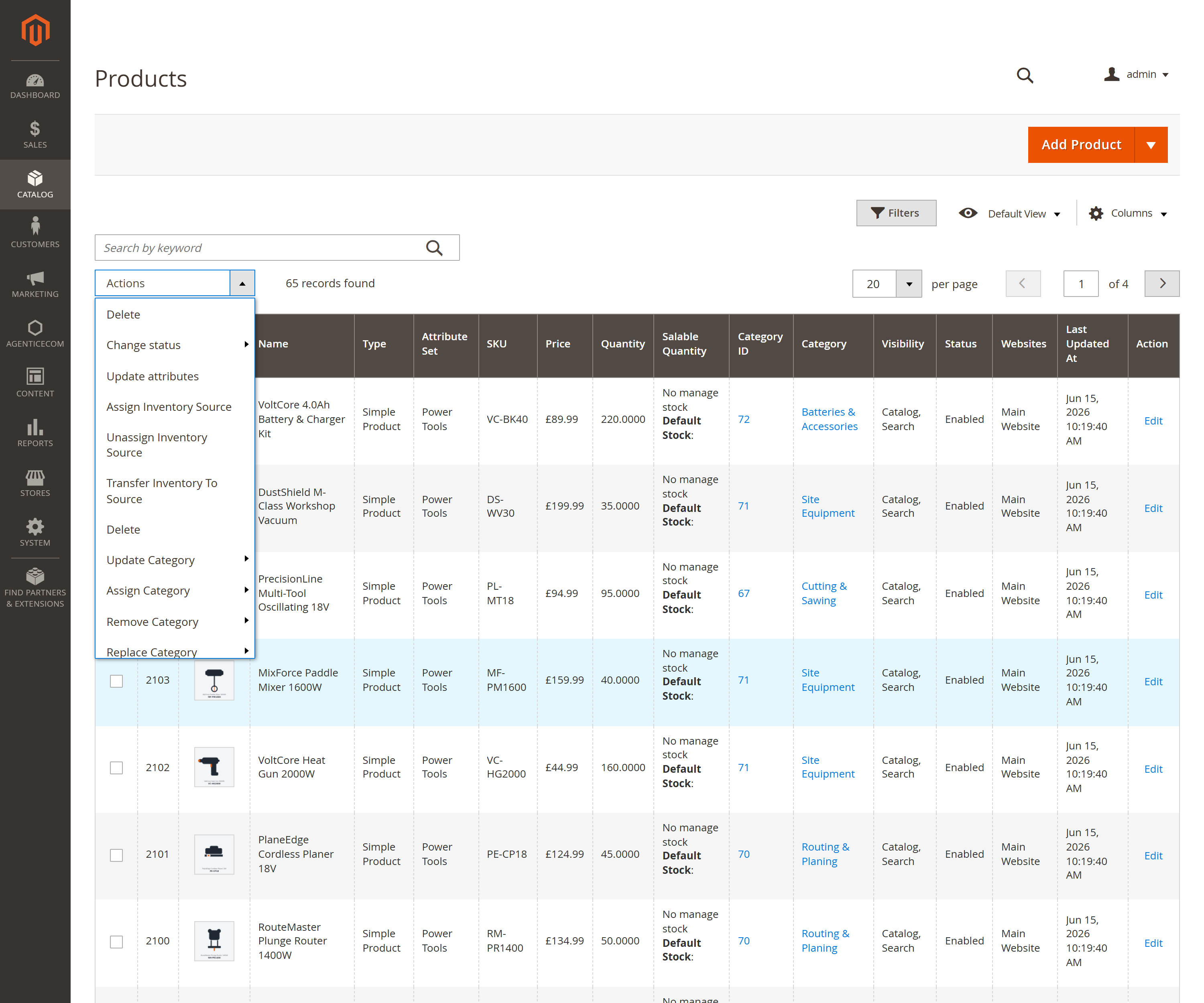
Bulk Product Operations adds bulk actions to your product grid’s Actions menu — select products, pick an operation, and apply it to all of them at once. The product-grid menu covers the everyday operations (status, visibility, repricing, categories, copy/remove options & images, attribute set, delete); the full 37-command engine — including find-and-replace text, related/up-sell/cross-sell links, inventory sources and advanced/tier prices — is available headless over GraphQL and the CLI. Every run is recorded in an audit history.
Install Bulk Product Operations with Composer using your AgenticEcom licence key (find it on your My Licences page — one key unlocks every module you own):
# 1. Register the AgenticEcom repository (once per store)composer config repositories.agenticecom composer https://repo.agenticecom.netcomposer config --global --auth http-basic.repo.agenticecom.net <YOUR-LICENCE-KEY> x
# 2. Require this modulecomposer require agenticecom/module-bulkproductoperations
# 3. Apply itphp bin/magento setup:upgrade && php bin/magento setup:di:compile && php bin/magento cache:flushMagento
PHP
Where
Audit
Change Status · Change Visibility · Change Attribute Set · Update Attributes · Append / Replace text (find-and-replace in name/description).
Update Price · Update All Prices · Update Advanced Prices · Update Cost · Update Special Price · Modify Price using Cost · Modify Special using Cost / Price. Each supports set / increase / decrease and fixed or percentage, with configurable rounding.
Assign · Remove · Replace · Update Category — add to, take out of, or swap a product’s category assignments in bulk.
Add / Remove / Copy Related, Up-sell and Cross-sell links — including copying a source product’s links onto the whole selection.
Copy / Remove Images · Copy / Remove custom Options — clone a reference product’s gallery or option set across many products.
Assign / Unassign Inventory Source · Transfer Inventory (MSI) · Delete · Fast Delete (direct, high-volume deletion).
Go to Catalog → Products (or Catalog → Bulk Product Operations → Run Actions).
Select the products (filter first to target exactly the set you want).
Open the Actions dropdown and choose an operation; enter any parameters it needs (e.g. the new price, the category, the text to replace).
Apply. The result and a per-run entry land in the history.
The same engine is fully scriptable over GraphQL — ideal for PIM syncs and CI jobs:
# List the available operations{ massActionCommands { code label } }
# Execute one (admin token required)mutation {  executeMassAction(    command: "update_price"    product_ids: [101, 102, 103]    parameters: "{\"value\": 10, \"type\": \"percent\", \"action\": \"increase\"}"  ) { success processed_count error_count message history_id }}
# Review what's been run{ massActionHistory(pageSize: 20) { items { command_label product_count status admin_user created_at } total_count } }Yes — status and visibility are written at the default scope so the change takes effect across the store (using Magento’s native bulk-attribute update under the hood, which is also much faster than saving each product individually).
Yes — the price operations support set / increase / decrease, fixed or percentage, and cost-based modes (e.g. “set price to cost + 40%”), with a configurable rounding rule.
A high-volume deletion path for clearing large product sets quickly. It’s behind its own ACL
resource (fast_delete) so only authorised roles can run it, and bulk deletions above a
configurable threshold prompt for confirmation first.
Yes — every execution records the command, product count, status, the admin user and timestamps,
viewable in the admin and over the massActionHistory GraphQL query.
Operations are grouped under seven separate ACL resources, each grantable per role; the GraphQL mutation requires an admin token, accepts up to 5,000 product IDs per call, and size-limits and JSON-validates its parameter payload. Verified clean on PHP 8.4 and 8.5.