

Magento
Open Source 2.4.9 GA (and later 2.4.x).
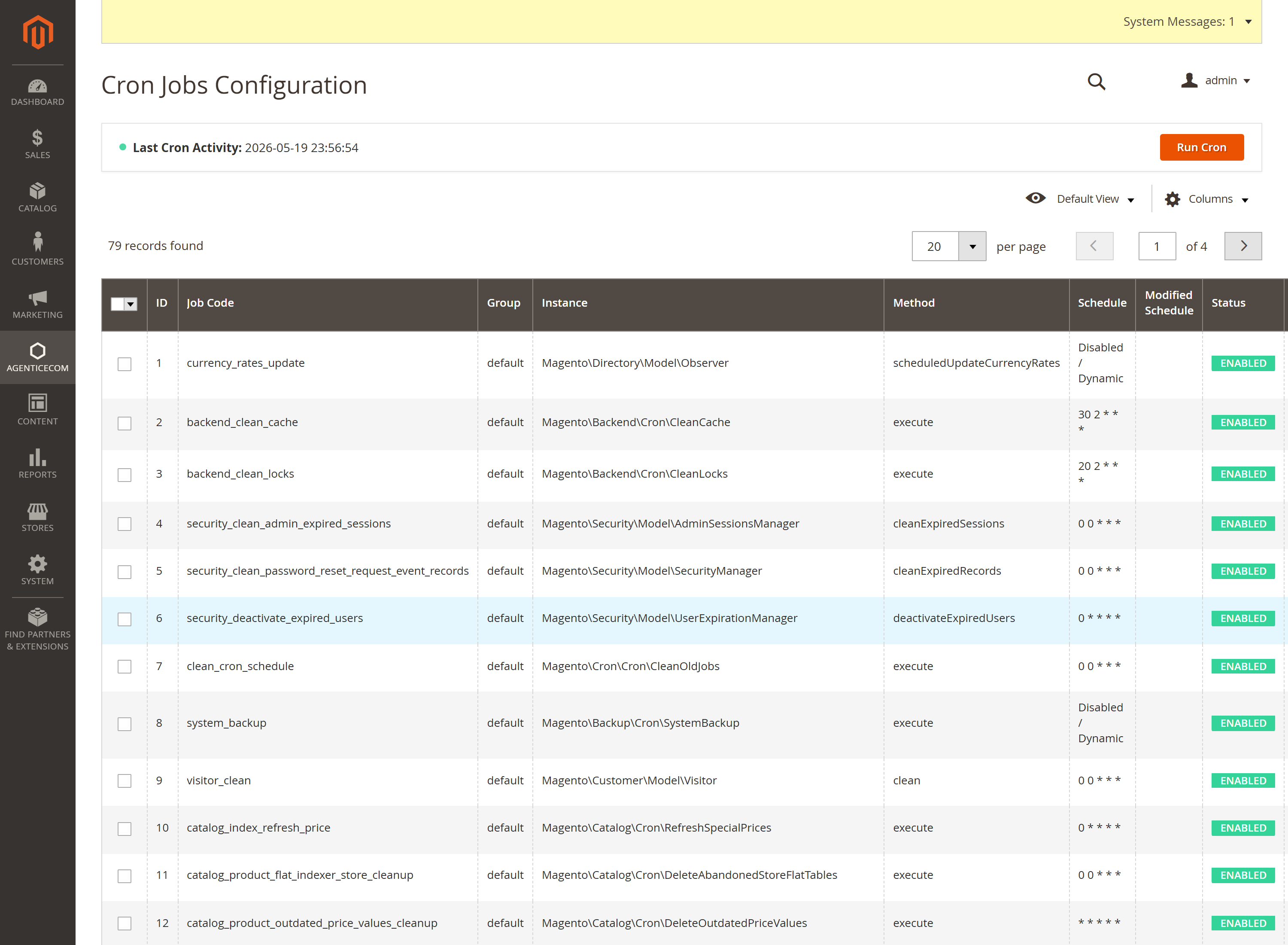
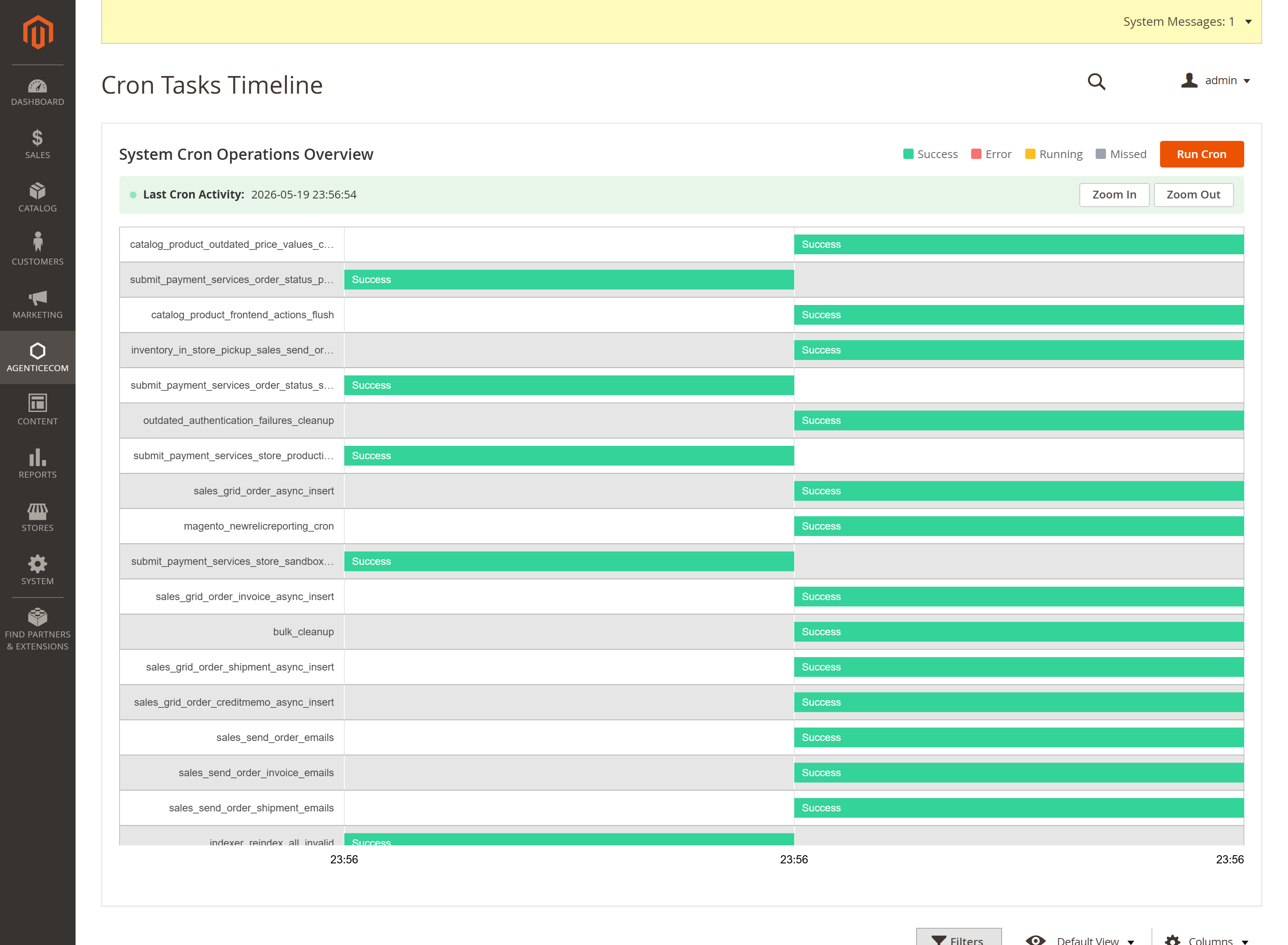
Magento’s cron is usually a black box you can only inspect over SSH. Cron Manager brings it into the admin: a grid of every configured job, a colour-coded timeline of recent runs, run-now buttons for a single job or the whole queue, schedule management, and email alerts when a job fails — so you can see what cron is doing and fix it without leaving Magento.
Install Cron Manager with Composer using your AgenticEcom licence key (find it on your My Licences page — one key unlocks every module you own):
# 1. Register the AgenticEcom repository (once per store)composer config repositories.agenticecom composer https://repo.agenticecom.netcomposer config --global --auth http-basic.repo.agenticecom.net <YOUR-LICENCE-KEY> x
# 2. Require this modulecomposer require agenticecom/module-cron-manager
# 3. Apply itphp bin/magento setup:upgrade && php bin/magento setup:di:compile && php bin/magento cache:flushMagento
PHP
No SSH
Alerts
Every configured cron job — code, group, the class/method it runs, its schedule and status — with Last Cron Activity so you can tell at a glance whether cron is even running.
A Gantt-style view of recent runs, colour-coded Success / Error / Running / Missed, with zoom — the fastest way to spot a job that’s failing or a queue that’s stalled.
The cron_schedule table as a manageable grid: filter by status, mass-execute pending
entries, or mass-delete old ones to keep the table lean.
Run a single job — click its action in the Jobs grid to execute it immediately and see the result.
Run the whole queue — Run Cron triggers a full cron pass on demand (handy after a fix, or on a host where the system crontab isn’t firing).
Mass-execute selected pending schedule entries, or mass-delete stale ones.
Turn on email notifications and Cron Manager emails you when a job errors — so a silently failing reindex, feed export or order-sync surfaces as an alert instead of a mystery days later.
The Jobs grid shows Last Cron Activity and the timeline shows recent runs colour-coded by outcome. If that timestamp is stale or the timeline is empty, your system cron isn’t firing — and you can trigger a pass with Run Cron while you fix it.
Yes — run it immediately from the Jobs grid, or mass-execute pending schedule entries. The result (success or the error message) is shown right away.
You can mass-delete old cron_schedule rows from the Schedule grid to keep it lean, filtering by
status first to target exactly what you want to clear.
Yes — only jobs registered in Magento’s cron config can be run (looked up by code, not by an arbitrary class name), every action is behind the Cron Manager ACL resource, and bulk operations are POST-protected. Verified clean on PHP 8.4 and 8.5.