

Magento
Review the exact release against your Open Source 2.4.x version.
Recorded on version 1.0.2 · Narrated walkthrough · English captions
Xero Connect 1.0.2 — Magento Admin setup

00:00:00 — Set up Xero Connect
Welcome to the Agentic Ecom Xero Connect Admin guide. We'll walk through the main setup screens and the checks to make before using the module. This guide assumes the extension is already installed.

00:00:12 — Open settings and choose scope
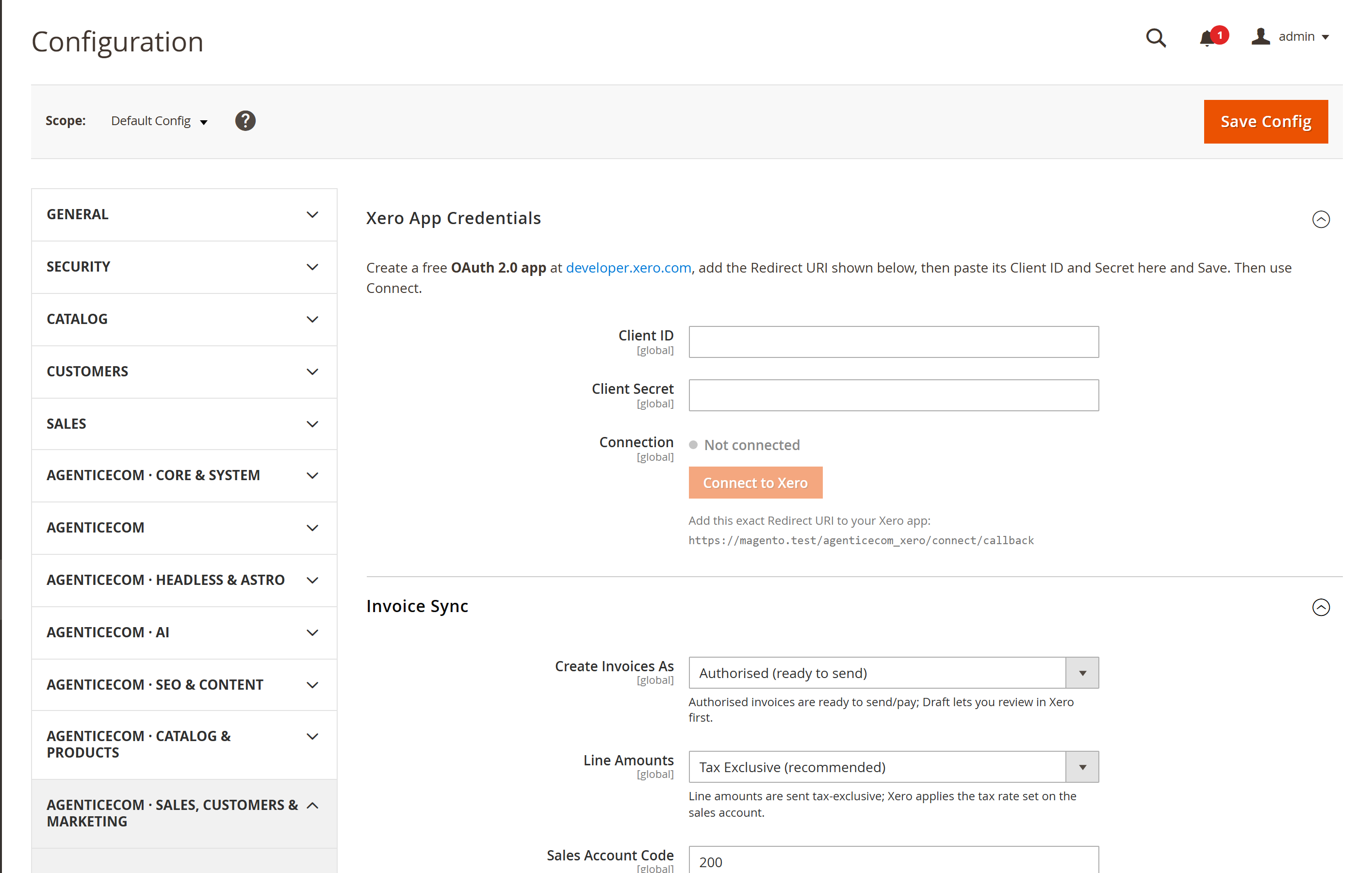
Start in Magento Admin and open Stores, Configuration. Choose Xero Connect. Check the Scope selector before editing. Use the appropriate website or store view where the setting supports it. The screen values here are a demonstration; enter the settings and service details that belong to your own store.

00:00:32 — Prepare your own Xero application
Enter the Client I D and Client Secret from your own Xero OAuth application. Complete its authorised connection flow with the intended organisation. The module needs a genuine merchant connection; it cannot create an accounting link from demonstration credentials. Keep the private application values concealed.

00:00:52 — Choose invoice and amount settings
In Invoice Sync, choose whether new invoices should be created as drafts or another supported state. Review Line Amounts against your tax and accounting policy. Start with a cautious staging configuration so an incorrect mapping does not create live accounting records.

00:01:10 — Map account codes
Set Sales Account Code and Shipping Account Code to valid codes in the connected Xero organisation. Check how products, shipping and tax will appear on the resulting invoice. Magento data and Xero accounting choices need to agree before you enable automatic processing.

00:01:29 — Verify one controlled invoice
Leave Auto-Push New Orders off until you have checked a single deliberate test order. Inspect the resulting Xero invoice and the confirmed invoice I D recorded in Magento. If a timeout leaves the result uncertain, inspect Xero before retrying so you do not create a duplicate invoice.

00:01:48 — Save and verify your setup
When your required settings are complete, use the screen's Save control and wait for Magento's confirmation. Then reopen the record or configuration and check the saved values at the intended scope. If the storefront still shows earlier settings, refresh the relevant caches. Test your own configuration before using it with customers.

00:02:10 — Your setup checklist
That's the Admin setup walkthrough for Xero Connect. Check permissions and scope, review the module-specific settings, then save and verify a small staging example. Use the written guide at user guides dot Agentic Ecom dot net for installation details, complete field references and any separate storefront integration steps.
Most stores still move sales into their accounts by hand — re-keying every Magento order into Xero, or paying for middleware that breaks on each upgrade. Xero Connect pushes a Magento order to Xero as a proper sales invoice in one click: it connects over OAuth 2.0 with your own Xero app, matches or creates the customer, and records the Xero invoice ID after a confirmed success. Check Xero before retrying an order when a response failed or another push may still be running.
Install Xero Connect with Composer using your AgenticEcom licence key (find it on your My Licences page — one key unlocks every module you own):
# 1. Register the AgenticEcom repository (once per store)composer config repositories.agenticecom composer https://repo.agenticecom.netcomposer config --global --auth http-basic.repo.agenticecom.net <YOUR-LICENCE-KEY> x
# 2. Require this modulecomposer require agenticecom/module-xero-connect
# 3. Apply itphp bin/magento setup:upgrade && php bin/magento setup:di:compile && php bin/magento cache:flushMagento
PHP
Connection
Costs
One-click invoice
Open any order and click Push to Xero — a sales invoice is created in your Xero organisation with the line items, customer and totals from the order.
Single, bulk or automatic
Push one order from its detail page, select many in the Orders grid and push in bulk, or turn on Auto-Push to send each order the moment its Magento invoice is created.
Repeat handling
After a confirmed sync, the saved Xero invoice ID makes an ordinary repeat skip that order. Check an uncertain response in Xero before retrying.
Customers handled
Buyers are matched to a Xero contact by email, or created automatically if they’re new — your contact records should be reviewed for matching and duplicate handling.
At developer.xero.com, create an OAuth 2.0 app for your organisation and review Xero’s current developer terms.
In Magento, go to Stores → Configuration → AgenticEcom → Xero Connect. Copy the Redirect URI shown there and paste it into your Xero app’s Redirect URIs list, then save the Xero app.
Back in Magento, paste your Xero app’s Client ID and Client Secret into the configuration and Save.
Click Connect to Xero, authorise your organisation in the popup, then close it. Magento stores the returned tokens encrypted.
Set the Invoice Sync options — invoice status, the sales and shipping account codes to map to, and (optionally) Auto-Push New Orders.
Open the order in Sales → Orders and click Push to Xero. The order’s Xero invoice ID is recorded on it once the invoice is created.
In the Sales → Orders grid, tick the orders you want, then choose Actions → Push to Xero. Already confirmed synced orders are skipped. Check uncertain previous attempts in Xero before retrying.
Enable Auto-Push New Orders in the configuration. Each order is then pushed to Xero as soon as its Magento invoice is created — no manual step at all.
Create an OAuth 2.0 app in your own Xero developer account and connect it to the Xero organisation you want to use. Review Xero’s current account, API and billing terms for your use case.
After a confirmed sync, the saved Xero invoice ID causes an ordinary repeat to be skipped. If the response failed or pushes overlap, check Xero for an existing invoice before retrying.
Buyers are matched to an existing Xero contact by email address. If no contact exists, one is created automatically, so your Xero contact list stays in step with your store.
The default line-amount mode is tax-exclusive; the module also offers inclusive and no-tax modes. Review the sales-account tax mapping and compare an actual invoice before scheduling pushes.
Yes — your Client Secret and the OAuth access and refresh tokens are stored with Magento’s encrypted
configuration backend and decrypted only when a sync runs. The authorisation flow is CSRF-protected with a
one-time state value. Check the exact package and your PHP version before production use.