

Magento
Open Source 2.4.9 GA (and later 2.4.x).
Shipping Matrix is a table-rate shipping carrier. Instead of a single flat fee, you upload a matrix of rates — each row says “for this destination, in this weight/subtotal/quantity band, charge this price for this method” — and the carrier picks the right rate at checkout.
It does everything Magento’s built-in Table Rates does, and more: multiple named methods per band (Standard and Express on the same row set), most-specific-rule-wins matching so a city- or postcode-level rate overrides a broad country rate, numeric postcode ranges, handling fees, free-shipping awareness, and a GraphQL query so a headless (Astro) storefront can read the same matrix.
Install Shipping Matrix with Composer using your AgenticEcom licence key (find it on your My Licences page — one key unlocks every module you own):
# 1. Register the AgenticEcom repository (once per store)composer config repositories.agenticecom composer https://repo.agenticecom.netcomposer config --global --auth http-basic.repo.agenticecom.net <YOUR-LICENCE-KEY> x
# 2. Require this modulecomposer require agenticecom/module-shipping-matrix
# 3. Apply itphp bin/magento setup:upgrade && php bin/magento setup:di:compile && php bin/magento cache:flushMagento
PHP
Storefront
Scope
Every cart at checkout has a destination (country, region/state, city, postcode) and a measure — its total weight, order subtotal, or number of items, depending on the Condition you choose. The carrier finds the matrix rows whose destination matches the cart and whose band contains the measure, then returns each as a selectable shipping method.
Pick the measure — set Condition to Weight vs. Destination, Order Subtotal vs. Destination, or # of Items vs. Destination. Every rate row is then banded on that measure.
Author rows from most specific to catch-all. A row can pin an exact country, region,
city and postcode, or use * as a wildcard for any of them.
At checkout, the most specific matching tier wins. A row matching the cart’s
city or postcode beats a broad country-level row; a country row beats the global
* catch-all. Within the winning tier, every band that contains the cart’s measure is
offered (so Standard and Express can both appear).
No match? Fall back. If nothing matches the destination, the carrier drops to the
global catch-all row (* country). If even that is absent, it shows your Displayed Error
Message instead of a price.
Rates are managed as a CSV file you import per website. Each row has nine columns:
| # | Column | Meaning | Wildcard |
|---|---|---|---|
| 1 | Country | ISO-2 (GB) or ISO-3 (GBR) code | * = any country |
| 2 | Region/State | Region code (e.g. CA, TX) | * = any region |
| 3 | City | City name (matched case-insensitively) | * = any city |
| 4 | Zip From | Postcode, or start of a numeric range | * = any postcode |
| 5 | Zip To | End of a numeric range (range mode only) | * = none |
| 6 | Condition From | Lower bound of the band (inclusive) | * = 0 |
| 7 | Condition To | Upper bound of the band (inclusive) | * = unlimited |
| 8 | Price | Shipping price for this row | — |
| 9 | Shipping Method | Method name shown to the customer | — |
Country,Region/State,City,Zip From,Zip To,Condition From,Condition To,Price,Shipping MethodGB,*,*,*,*,0,2,3.99,Standard (2-3 days)GB,*,*,*,*,2,10,5.99,Standard (2-3 days)GB,*,*,*,*,10,30,9.99,Standard (2-3 days)GB,*,*,*,*,0,30,12.99,Express (next day)GB,*,London,*,*,0,30,7.99,Same-day (London)US,*,*,*,*,0,5,14.99,International Economy*,*,*,*,*,0,1000000,19.99,Worldwide Flat RateThe Import and Export controls live on the carrier config and are only shown at website scope (switch the Scope selector to a website first).
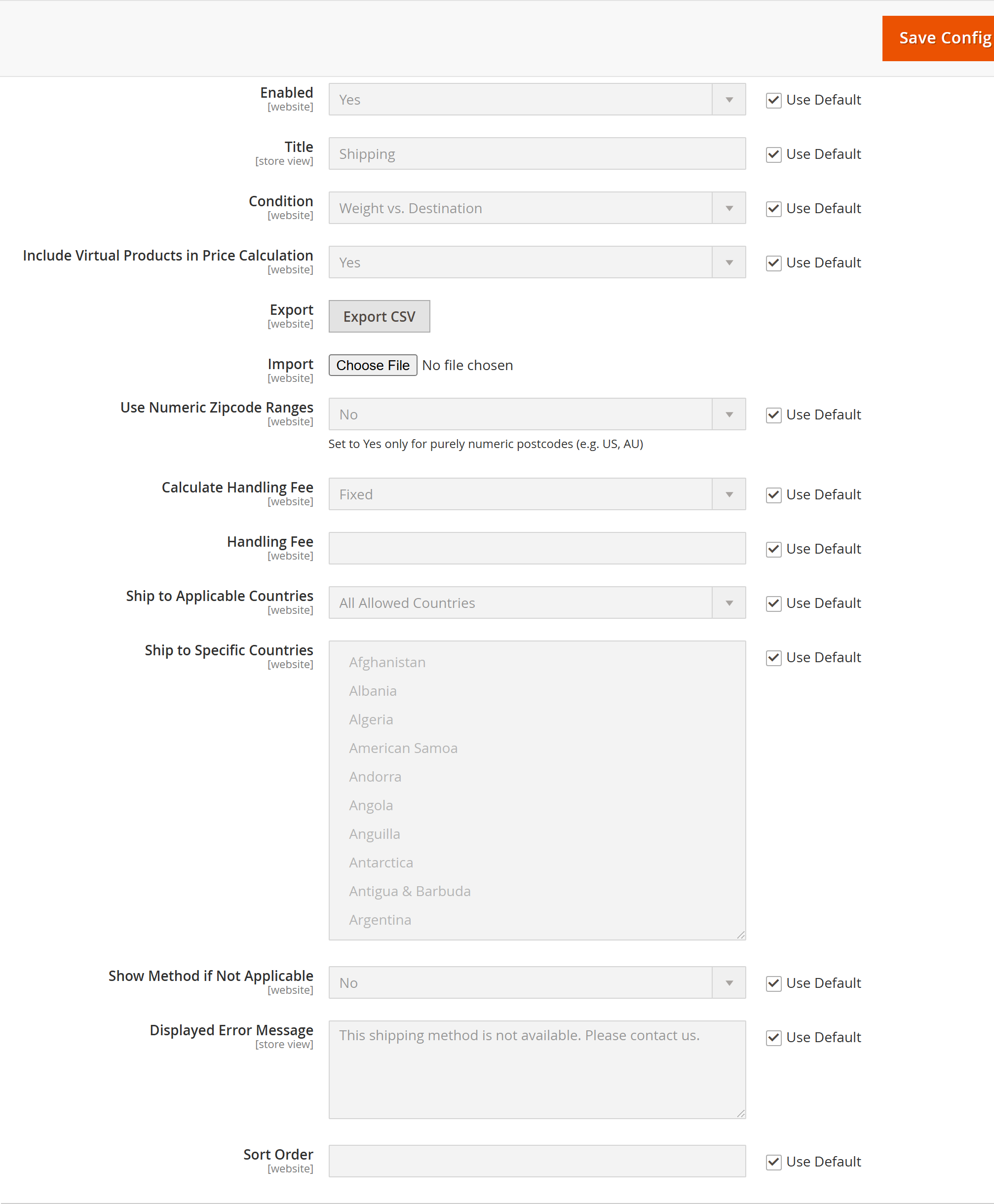
Country and region names are resolved against Magento’s directory tables, so a bad country or region code is reported with its row number rather than failing silently. Duplicate rows (same destination + band + method) are rejected and reported too.
Click Export CSV to download the current rows for the selected website and condition, in exactly the import format — so you can edit in a spreadsheet and re-import. The export uses the Condition currently selected in the dropdown.
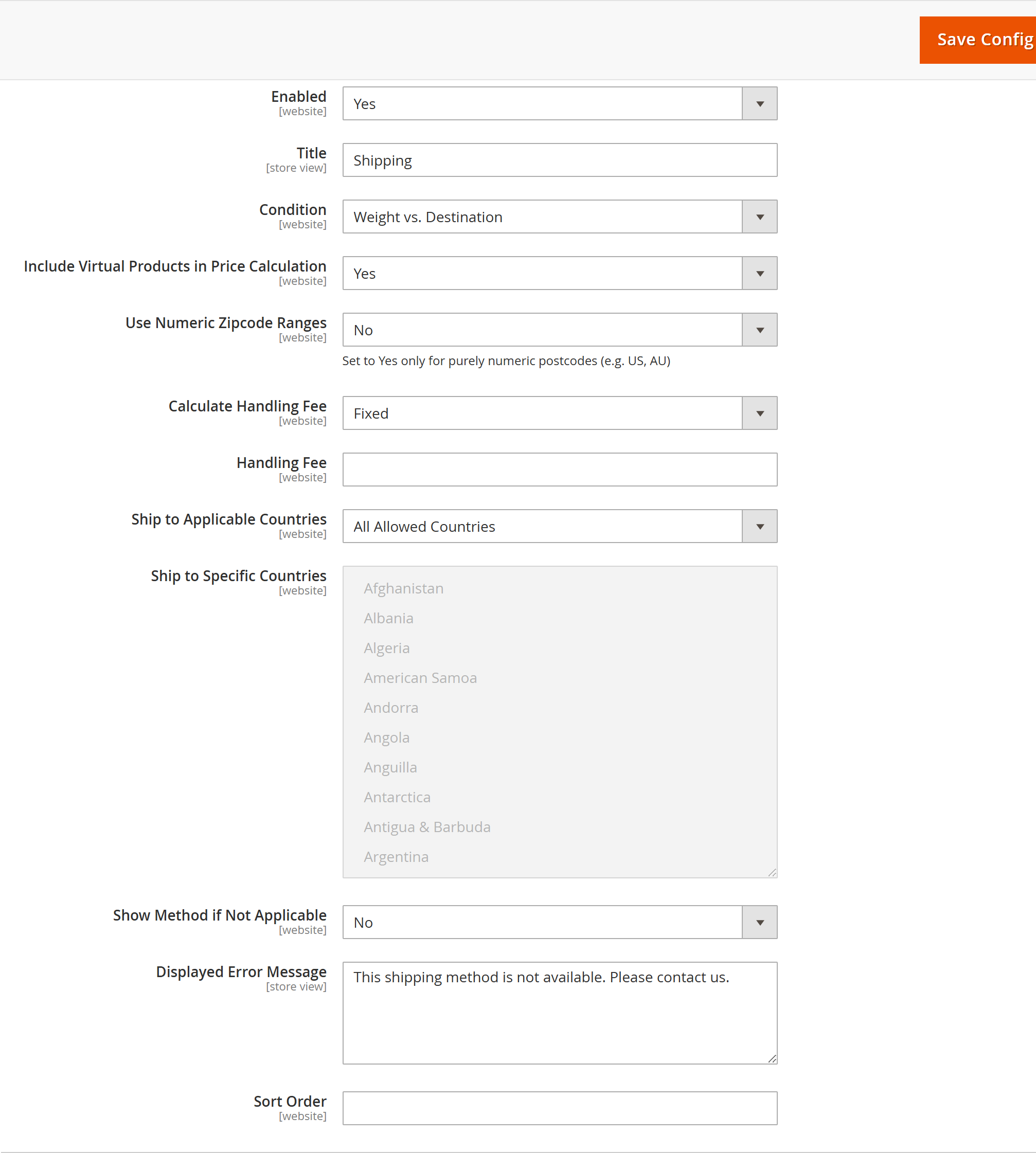
Stores → Configuration → Sales → Delivery Methods → AgenticEcom Shipping Matrix
| Field | What it does |
|---|---|
| Enabled | Turn the carrier on/off (per website). |
| Title | Carrier heading shown at checkout (e.g. “Shipping”). |
| Condition | The measure rates are banded on: Weight, Order Subtotal, or # of Items vs. destination. |
| Include Virtual Products in Price Calculation | When No, virtual products’ value is subtracted before subtotal-based matching. |
| Export | Download the current matrix as CSV (website scope). |
| Import | Upload a CSV to replace the matrix (website scope). |
| Use Numeric Zipcode Ranges | Match postcodes inside Zip From–Zip To. Set Yes only for purely numeric postcodes (US, AU); leave No for alphanumeric postcodes (UK). |
| Calculate Handling Fee | Add a Fixed amount or a Percentage of the rate as handling. |
| Handling Fee | The fixed amount or percentage applied. |
| Ship to Applicable Countries | All countries, or a specific list. |
| Ship to Specific Countries | The allowed list when restricted. |
| Show Method if Not Applicable | Show the carrier (with the error message) even when no rate matches, or hide it. |
| Displayed Error Message | Shown when the carrier is applicable but no rate matched. |
| Sort Order | Position among other carriers at checkout. |
With Use Numeric Zipcode Ranges = Yes, a row with Zip From 1000 and Zip To 2999
matches any numeric postcode in that range. With No, the Zip From value is treated as a
match pattern (use * for “any postcode”), which is the right choice for alphanumeric
postcodes like the UK’s.
The carrier is free-shipping aware: items flagged for free shipping (e.g. by a cart price rule) are discounted out of the weight/subtotal/quantity measure, and when an entire shipment qualifies, the matched method is offered at £0.00.
A headless (Astro) storefront gets live checkout rates through Magento’s standard
setShippingAddressesOnCart / estimate-shipping-methods flow — Shipping Matrix appears there
like any carrier. In addition, the module exposes a direct rate query so a storefront can
preview the matrix for a destination (e.g. a “shipping from £x” badge):
{ shippingMatrixRates(country_id: "GB", region_id: 0, city: "London", postcode: "SW1A 1AA") { shipping_method price condition_from_value condition_to_value dest_city dest_zip }}country_id is required; region_id, city and postcode are optional and filter the
result — supplying city: "London" returns the London-specific rows plus the
matching wildcard rows, so the storefront sees exactly what applies to that destination.
Table Rates supports one method and a single condition. Shipping Matrix lets you offer several named methods from one rate set (Standard and Express), adds city-level precedence, handling fees, a GraphQL rate query, and reports import errors per row instead of failing the whole file.
Yes. Rates are stored per website and imported/exported at website scope, so each website (or brand) can price shipping independently.
The most specific destination tier wins — a postcode/city match beats a region match, which
beats a country match, which beats the global * catch-all. Within the winning tier, every
band that contains the cart’s measure is offered as a separate method.
Leave Use Numeric Zipcode Ranges = No for alphanumeric postcodes. Range mode only works for
purely numeric postcodes (US ZIP, AU). For the UK, match the whole country/region/city with *
in the postcode columns, or use an exact postcode in Zip From.
The carrier falls back to the global * catch-all row if you’ve defined one. If there’s no
catch-all either, it shows your Displayed Error Message (when Show Method if Not
Applicable is on) instead of a price.
The import/export controls are behind the AgenticEcom_ShippingMatrix::config ACL resource;
the export controller is GET-only and ACL-gated; imported CSV values are parsed and validated
(country/region resolved against Magento’s directory, numeric fields range-checked) before any
database write; and the module is verified clean on PHP 8.4 and 8.5.