

Magento
Check the exact release against your Magento Open Source version.
Recorded on version 1.0.2 · Narrated walkthrough · English captions
Headless Email URLs 1.0.2 — Magento Admin setup

00:00:00 — Set up Headless Email URLs
Welcome to the Agentic Ecom Headless Email URLs guide. We'll use Magento Admin to review the setup and explain the handoff to your headless storefront. This walkthrough covers stable version 1 point 0 point 2 and assumes the extension is installed.

00:00:16 — Find Headless Storefront Links
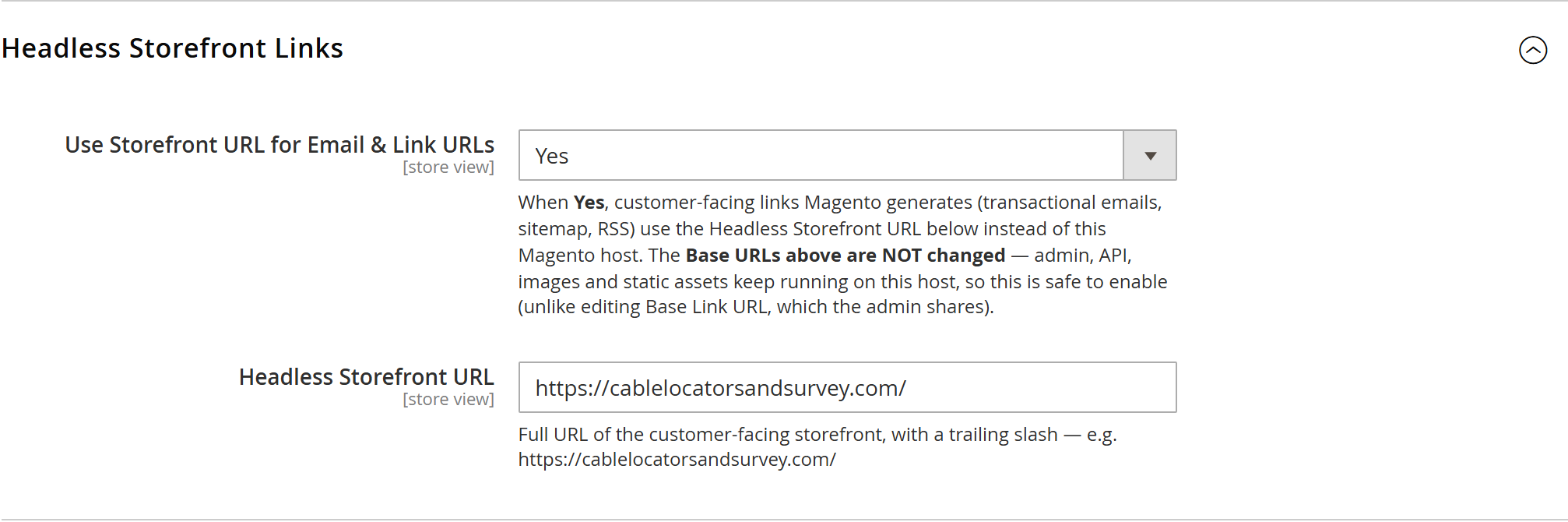
Open Stores, Configuration, General, Web. Expand Headless Storefront Links. This module changes customer-facing links to use your headless storefront address. It has its own controls, so you do not need to change Magento's Base URLs to set it up.

00:00:33 — Choose the store and enable the feature
Check the configuration scope for the website or store view you are configuring. Set Use Storefront URL for Email and Link URLs to Yes. Inherited values may need to be released at that scope before you edit them. The on-screen values are a demonstration, rather than a production recommendation.

00:00:53 — Enter the customer-facing URL
Enter the full H T T P S address of the headless storefront in Headless Storefront URL. Use the domain customers should visit. Magento's Admin, API and media hosting still need their own working addresses. Check that your Astro storefront implements the account and product routes used by customer emails.

00:01:14 — Save and verify customer links
Save the configuration on your store, then use a test customer to review the links generated by transactional emails, the sitemap and R S S. Confirm the destination host and the complete path. For password-reset and other account links, check the full journey on your actual frontend. This recording does not send an email or save new settings.

00:01:37 — Your setup checklist
Your next steps are to select the correct configuration scope, enter the storefront https address, verify test email and sitemap links. Use a staging store for the end-to-end check. The complete installation and integration reference is at user guides dot Agentic Ecom dot net.
Run Magento headless and the admin and API live on one host (say magento.yourstore.com) while
your customer-facing storefront lives on another (yourstore.com). But Magento still builds the
links inside transactional emails — order confirmations, invoices, shipment notices, password
resets — using its own Base URL. So customers receive emails that link back to your backend, not
the store they know. Headless Email URLs fixes that with one setting, and without the
dangerous workaround of editing Base Link URL.
Install Headless Email URLs with Composer using your AgenticEcom licence key (find it on your My Licences page — one key unlocks every module you own):
# 1. Register the AgenticEcom repository (once per store)composer config repositories.agenticecom composer https://repo.agenticecom.netcomposer config --global --auth http-basic.repo.agenticecom.net <YOUR-LICENCE-KEY> x
# 2. Require this modulecomposer require agenticecom/module-headless-email-url
# 3. Apply itphp bin/magento setup:upgrade && php bin/magento setup:di:compile && php bin/magento cache:flushMagento
PHP
Frontend
Safety
The module hooks Magento’s link generation in the frontend area only — the context Magento uses when it renders an email — and swaps the backend host for your storefront URL.
| Surface | Rewritten? |
|---|---|
| Transactional emails (order, invoice, shipment, credit memo, reset, welcome) | ✅ Point at the storefront |
| Newsletter / RSS links | ✅ Point at the storefront |
| XML sitemap entries | ✅ Point at the storefront |
| Admin, REST & GraphQL API URLs | ❌ Stay on the Magento host |
| Media, static & image URLs | ❌ Stay on the Magento host |
Stores → Configuration → General → Web → Headless Storefront Links — it sits right next to Base URLs, the natural home for a setting about which URL customer links use.
Set Use Storefront URL for Email & Link URLs to Yes.
Enter your Headless Storefront URL — the full customer-facing URL with a trailing
slash, e.g. https://yourstore.com/.
Save and run php bin/magento cache:flush. Send yourself a test order email — every link now
points at your storefront.
No. It only rewrites links generated in the frontend (email) area. Your Base URLs are never modified, so the admin, REST/GraphQL APIs, media and static assets keep using the Magento host.
Because Magento uses one shared Base Link URL for the storefront, the admin and the API — change it and you change all three, which can lock you out of the admin. This module avoids that entirely.
Yes. It operates at the Magento layer, so Astro, Hyvä, PWA Studio or a fully custom storefront all benefit — they just need to serve the routes the emails link to (orders, account, and so on).
SMTP for reliable delivery, and Product Alerts — whose price-drop emails link straight back to your storefront thanks to this module.