

Magento
Check the exact release against your Magento Open Source version.
Recorded on version 1.0.2 · Narrated walkthrough · English captions
Product Alerts — Headless 1.0.2 — Magento Admin setup

00:00:00 — Set up Product Alerts — Headless
Welcome to the Agentic Ecom Product Alerts — Headless guide. We'll use Magento Admin to review the setup and explain the handoff to your headless storefront. This walkthrough covers stable version 1 point 0 point 2 and assumes the extension is installed.

00:00:15 — Use Magento’s native alert settings
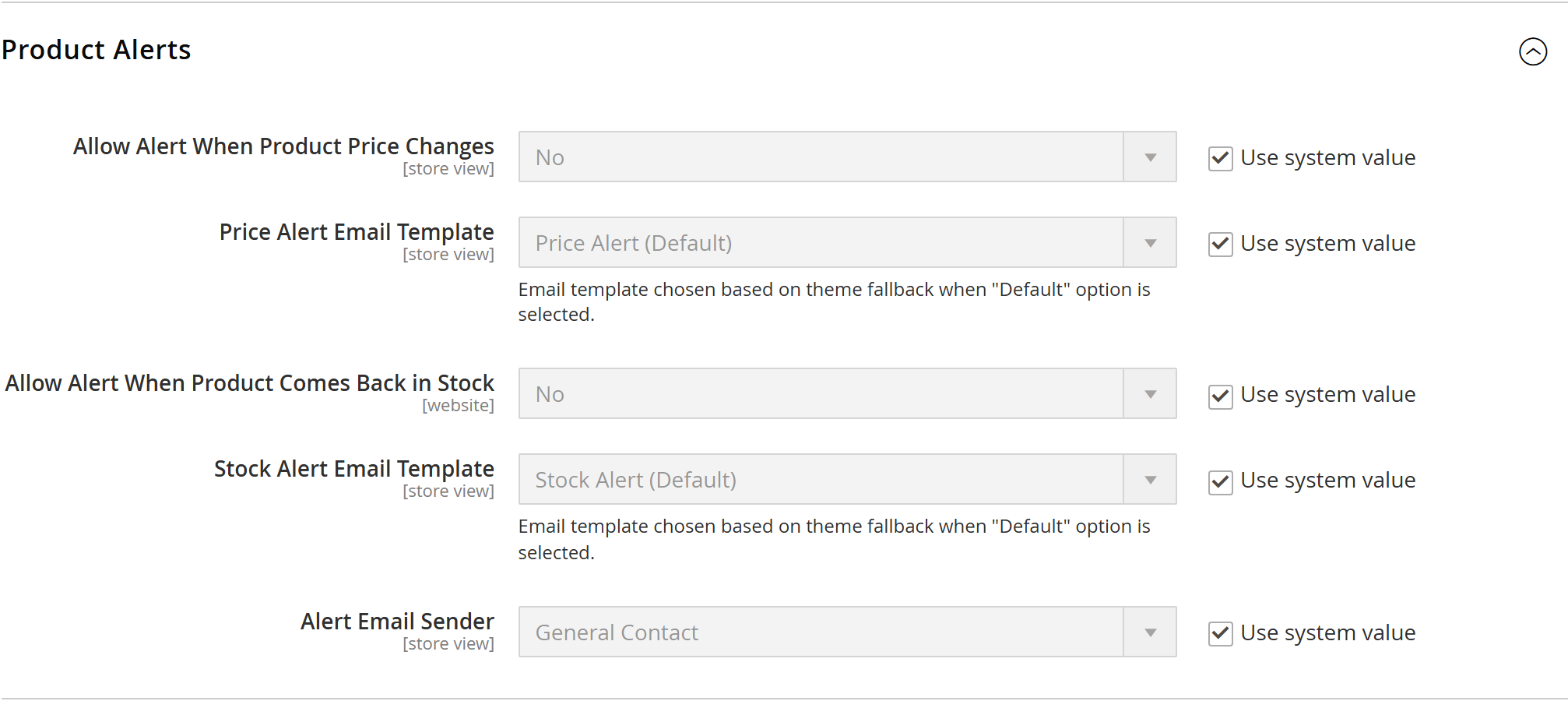
Open Stores, Configuration, Catalog, Catalog, Product Alerts. There is no separate Agentic Ecom configuration form. This extension exposes Magento's native product alerts to a headless storefront through Graph Q L; Magento still manages the subscriptions and email processing.

00:00:36 — Enable the alert types you offer
Allow Alert When Product Price Changes enables price alerts. Allow Alert When Product Comes Back in Stock enables stock alerts. Turn on the types your storefront offers. Review the matching email templates and sender identity, and check the configuration scope before saving.

00:00:54 — Review the email schedule
Open Product Alerts Run Settings. Review Frequency and Start Time, plus the error-email settings used to report processing failures. Your server must also run Magento cron correctly. A saved subscription does not prove that an alert email has been sent.

00:01:12 — Connect the signed-in customer flow
Your storefront calls subscribe Product Alert with the product S K U and the PRICE or STOCK alert type. It must use the signed-in customer's token; guests need to sign in first. Show the returned success or error message to the shopper. Pair this with Headless Email URLs so the email returns to the correct storefront.

00:01:33 — Save and test a controlled alert
Save the settings on your staging store. Use a test customer and product to subscribe, trigger the relevant price or stock change, and check cron processing and email delivery. Follow the email's product and unsubscribe links. This walkthrough does not create a subscription or send mail.

00:01:51 — Your setup checklist
Your next steps are to enable the required native alert types, confirm customer authentication and cron, test delivery and storefront links. Use a staging store for the end-to-end check. The complete installation and integration reference is at user guides dot Agentic Ecom dot net.
Magento has a quietly high-converting feature built in: Product Alerts. A shopper can ask to be emailed when a product’s price drops or when it’s back in stock — and the day that email reaches them, they can return to the product. But the signup UI ships only for the Luma frontend, so the moment you go headless it disappears. Product Alerts puts it back: a single GraphQL mutation your storefront calls to subscribe the signed-in customer, while Magento’s own engine does the rest.
Install Product Alerts with Composer using your AgenticEcom licence key (find it on your My Licences page — one key unlocks every module you own):
# 1. Register the AgenticEcom repository (once per store)composer config repositories.agenticecom composer https://repo.agenticecom.netcomposer config --global --auth http-basic.repo.agenticecom.net <YOUR-LICENCE-KEY> x
# 2. Require this modulecomposer require agenticecom/module-product-alerts
# 3. Apply itphp bin/magento setup:upgrade && php bin/magento setup:di:compile && php bin/magento cache:flushMagento
PHP
Frontend
Engine
Magento_ProductAlert (cron + emails).Call this when a signed-in shopper taps “alert me”:
mutation { subscribeProductAlert(input: { sku: "ABC-123", alert_type: PRICE }) { success message }}| Field | Notes |
|---|---|
input.sku | SKU of the product to watch. |
input.alert_type | PRICE (notify on price drop) or STOCK (notify when back in stock). |
success | true when the subscription was created. |
message | Human-readable status you can show the shopper. |
A signed-in shopper taps “Notify me on a price drop” on a product page.
Your storefront calls subscribeProductAlert with the SKU and PRICE (or STOCK).
The module writes the subscription to Magento’s native product-alert table for that customer.
Magento’s catalog_product_alert cron detects the price drop (or restock) and sends the
email through your configured mail transport.
The email links the shopper back to the product. Pair with Headless Email URLs so that link points at your storefront, not the backend.
There’s no module-specific config — it uses Magento’s standard Product Alerts settings:
Stores → Configuration → Catalog → Catalog → Product Alerts — enable Allow Alert When Product
Price Changes and/or Allow Alert When Product Comes Back in Stock, set the email templates and
sender, then make sure cron is running (the catalog_product_alert group sends the emails).
Yes — pass alert_type: STOCK for back-in-stock, PRICE for price-drop. Enable the matching
option under Catalog → Product Alerts.
Magento does — its native catalog_product_alert cron job. This module only handles the subscribe
step, so there’s no parallel mail system to maintain.
No — alerts are tied to a customer account (Magento keys them on customer_id). Prompt guests to
sign in first; your headless account area handles the auth.
Magento’s alert emails include the native unsubscribe link, and subscriptions appear under the customer’s account in the admin — all standard Magento behaviour.