

Magento
Open Source 2.4.9 GA (and later 2.4.x).
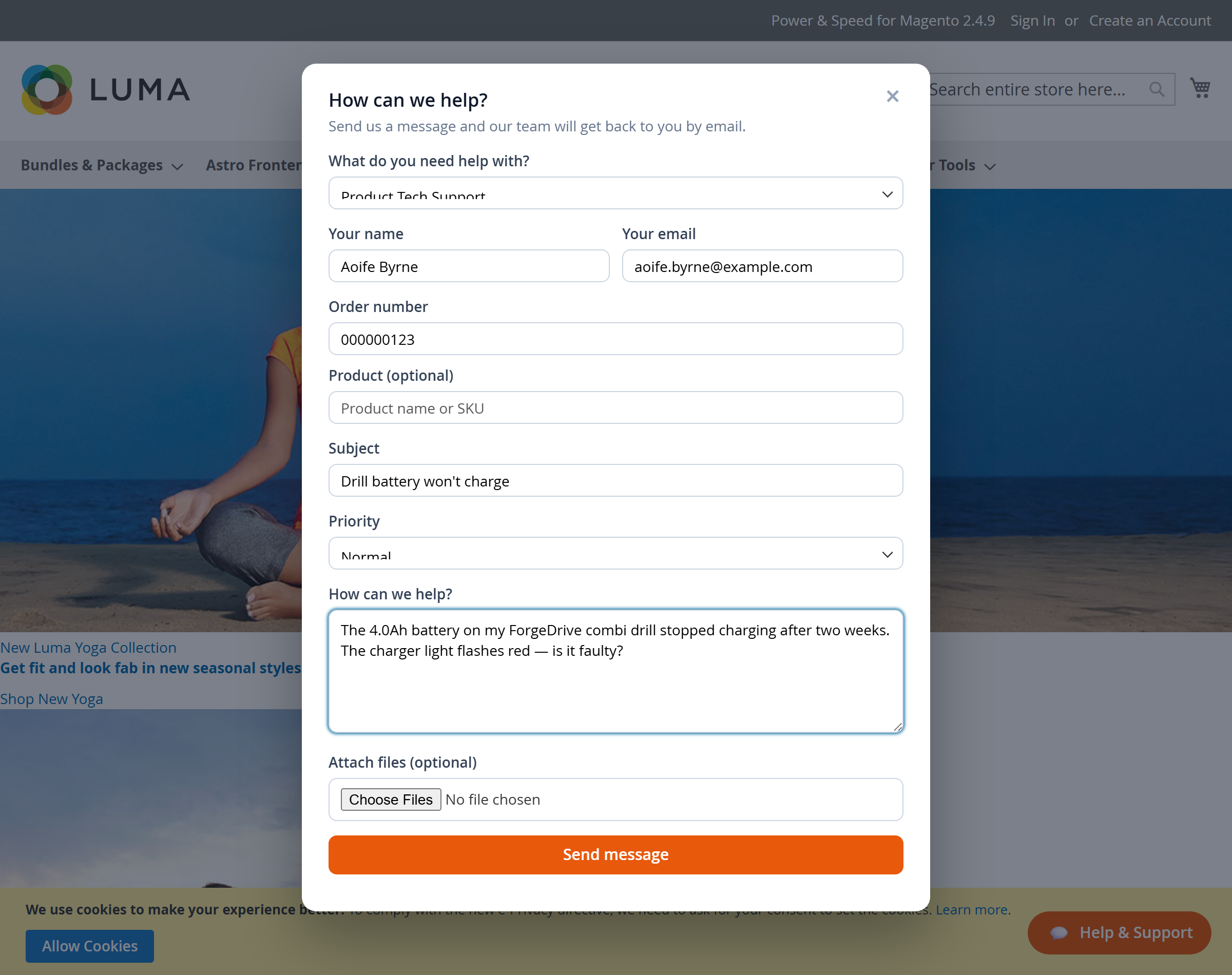
Turn every “Contact Us” form into a real helpdesk. Customers raise a ticket from a floating Help & Support popup, choose a topic (Pre-Sales, After-Sales or Product Tech Support), and you handle the whole conversation from one admin screen — with departments, canned responses, SLA timers, satisfaction ratings, file attachments and email notifications.
Everything works on the Luma storefront out of the box, and the exact same data is exposed over GraphQL for a headless/Astro storefront.
Install Support Tickets (Help Desk) with Composer using your AgenticEcom licence key (find it on your My Licences page — one key unlocks every module you own):
# 1. Register the AgenticEcom repository (once per store)composer config repositories.agenticecom composer https://repo.agenticecom.netcomposer config --global --auth http-basic.repo.agenticecom.net <YOUR-LICENCE-KEY> x
# 2. Require this modulecomposer require agenticecom/module-support-tickets
# 3. Apply itphp bin/magento setup:upgrade && php bin/magento setup:di:compile && php bin/magento cache:flushMagento
PHP
Storefront
Who can ask
Enable the module: Stores → Configuration → AgenticEcom · Sales, Customers & Marketing → Support Tickets (Help Desk) → General → Enable Support Tickets = Yes.
The three default departments — Pre-Sales, After-Sales and Product Tech Support — are created for you. Adjust them under Help Desk → Departments.
Visit your storefront. A floating Help & Support button appears bottom-right. Raise a test ticket.
Open Help Desk → Tickets in the admin, click the ticket, and reply. The customer is emailed your response and can reply straight back.
The floating button opens a popup that adapts to the chosen topic:
Logged-in customers have their name and email filled in automatically. Guests provide their own and receive a secure link to follow the conversation by email.
Departments are fully admin-configurable under Help Desk → Departments.
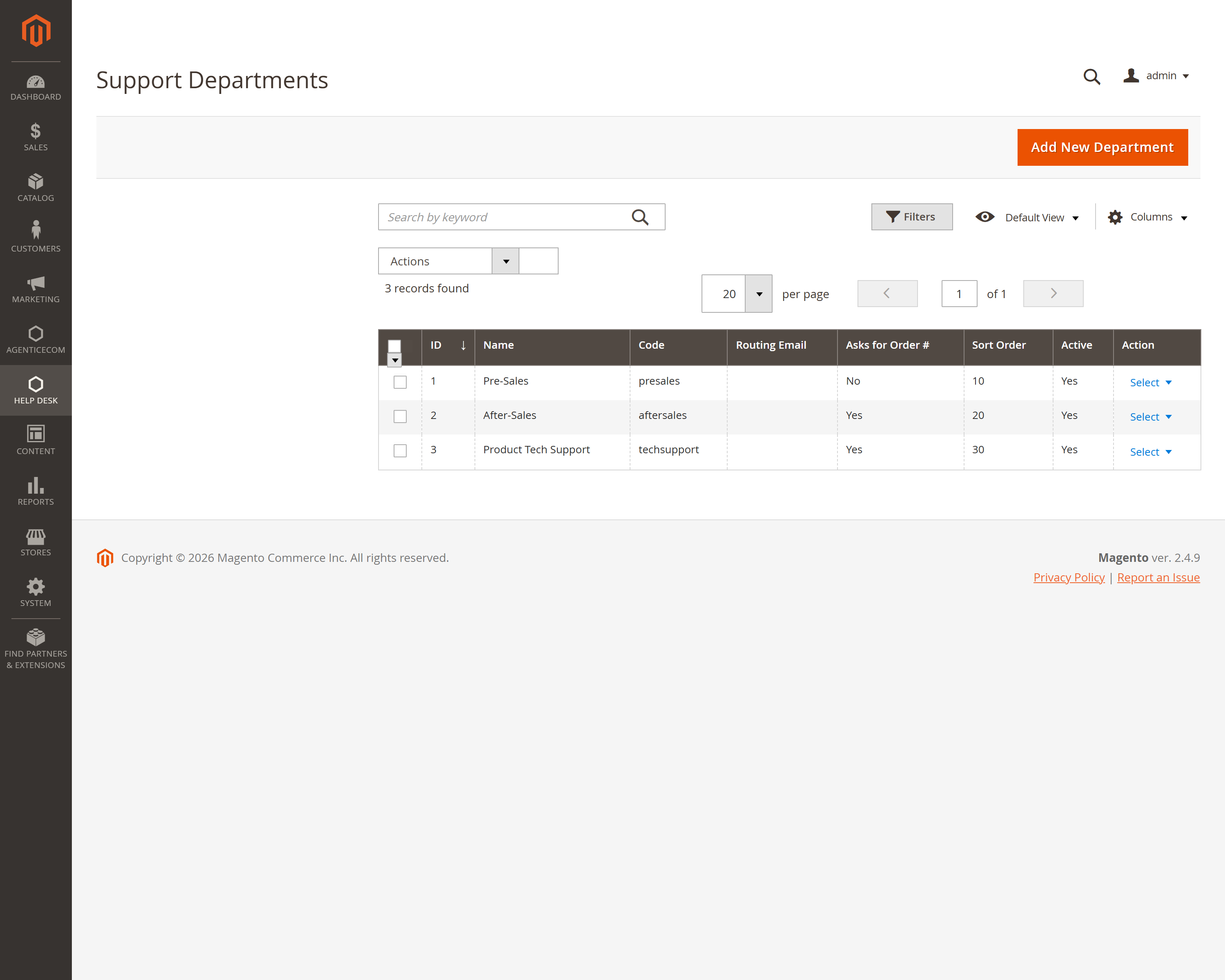
| Field | What it does |
|---|---|
| Name | The label customers see in the popup. |
| Code | Unique identifier (auto-generated from the name). |
| Description | Short helper text shown to customers. |
| Routing Email | Where new tickets in this department are emailed. Falls back to the global address, then the store’s general contact. |
| Ask for an order number | When Yes, the popup reveals the Order number + Product fields. |
| Default Assignee | An admin user automatically assigned to new tickets in this department. |
| Active | Hide a department without deleting its history. |
The ticket screen is a complete conversation view: the full thread on the left, and everything you need to act on the right.
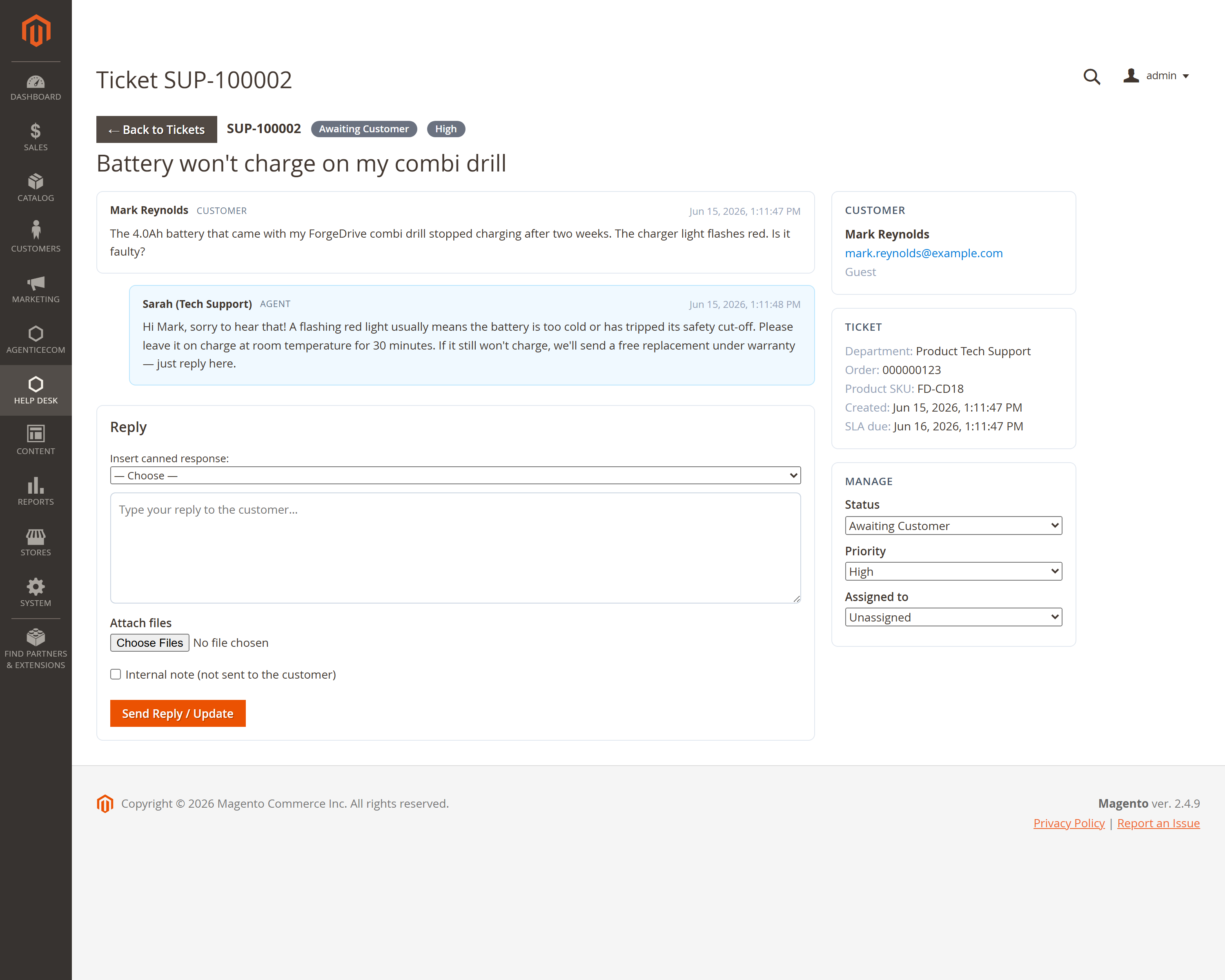
From here you can:
Statuses move automatically as the conversation flows, and you can always set them by hand.
| Status | Meaning | Set automatically when… |
|---|---|---|
| New | Just raised, not yet opened. | A ticket is created. |
| Awaiting Support | The ball is in your court. | A customer replies. |
| Awaiting Customer | Waiting on the customer. | An agent replies. |
| Open / On Hold | In progress / parked. | You set them manually. |
| Resolved | Sorted — triggers the satisfaction request. | You mark it resolved. |
| Closed | Finished. | You close it (a customer reply re-opens it). |
Save your common replies once under Help Desk → Canned Responses, then insert them into any reply with the Insert canned response dropdown. Responses can be global or scoped to a single department, so agents only see the macros that are relevant to the ticket they’re on.
Set a first-response target (in hours) per priority under Configuration → SLA Targets. Each new ticket gets an SLA due time, shown on the ticket and as a sortable column in the grid, so nothing slips through the cracks.
When a ticket is Resolved, the customer is invited (by email and on the ticket page) to rate the support they received from 1–5 stars, with an optional comment. Ratings appear on the ticket in the admin.
Customers and agents can attach files (screenshots, photos of a faulty item, documents). For safety, every upload is checked against an allow-list of extensions and a size cap before it is stored, and files are saved under random names so the originals can never collide or be guessed. Configure the allow-list under Configuration → Attachments.
The module sends transactional emails through Magento’s standard mail system (so it works with your SMTP/relay setup). Every email has its own template you can customise under Marketing → Email Templates:
| Template | Sent to | When |
|---|---|---|
| New Ticket | Agents | A ticket is raised |
| Ticket Received | Customer | A ticket is raised |
| Customer Replied | Agents | The customer replies |
| Agent Replied | Customer | You reply |
| Status Changed | Customer | The status changes |
| Rate Your Support | Customer | A ticket is resolved |
Logged-in customers get a Support Tickets entry in their account navigation, listing every ticket with its status and a link into the full conversation.
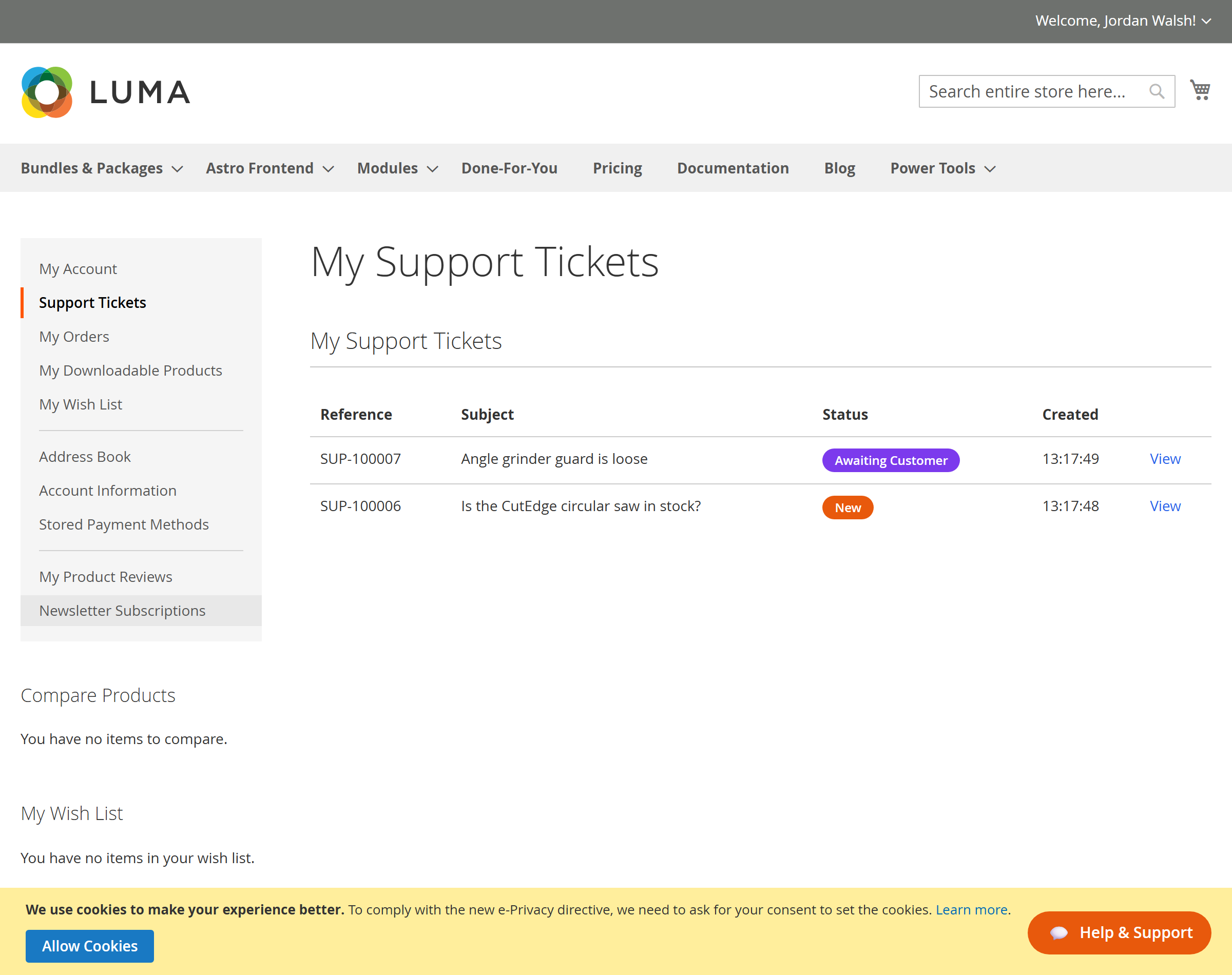
A headless storefront uses the same engine through GraphQL. Nothing extra to configure — the popup settings, departments and tickets are all available.
{ supportConfig { enabled allow_guests popup_enabled button_text heading accent_color csat_enabled recaptcha_site_key # public key only — the secret is never exposed departments { id name description requires_order } }}mutation { createSupportTicket(input: { department_id: 3 subject: "Battery won't charge" message: "The 4.0Ah battery stopped charging after two weeks." priority: "high" name: "Aoife Byrne" # omitted for logged-in customers (taken from the account) email: "aoife@example.com" order_increment: "000000123" product_sku: "FD-CD18" }) { success reference # e.g. SUP-100002 token # store this — guests use it to view/reply ticket { status messages { author_type message } } }}# View — guests pass the token; logged-in customers can omit it for their own tickets.query { supportTicket(reference: "SUP-100002", token: "the-secure-token") { reference subject status_label priority_label messages { author_type author_name message attachments { file_name download_url } } }}
# Replymutation { replyToSupportTicket(input: { reference: "SUP-100002" token: "the-secure-token" message: "Tried that — still flashing red." }) { status messages { message } }}
# The logged-in customer's own tickets (requires a customer token)query { customerSupportTickets { total_count items { reference subject status_label } } }All settings live under Stores → Configuration → AgenticEcom · Sales, Customers & Marketing → Support Tickets (Help Desk).
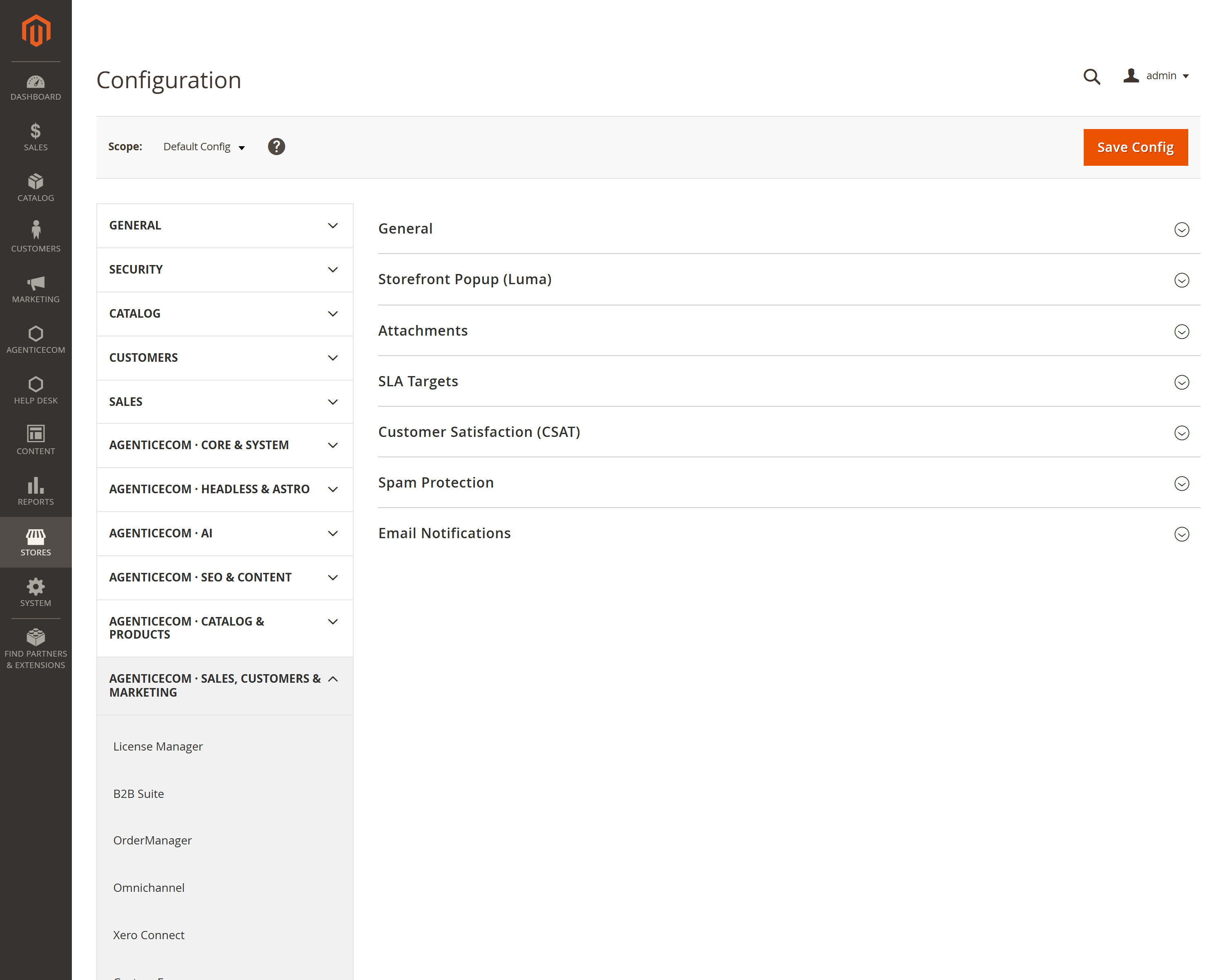
| Group | Key settings |
|---|---|
| General | Enable, allow guest tickets, reference prefix & start number. |
| Storefront Popup | Show the button, button text, heading, intro, position, accent colour, mobile visibility. |
| Attachments | Enable, allowed extensions, max size, max files per message. |
| SLA Targets | First-response hours per priority. |
| CSAT | Enable the satisfaction rating. |
| Spam Protection | Honeypot, reCAPTCHA v3 keys, minimum score. |
| Email Notifications | Enable, agent address, sender identity, and a template per email. |
hash_equals.Do customers need an account? No. Guests can raise tickets (if allowed) and follow them via the secure link in their emails. You can require login under General → Allow Guest Tickets.
Does it work with my headless storefront?
Yes — supportConfig, supportDepartments, createSupportTicket, replyToSupportTicket,
rateSupportTicket, supportTicket and customerSupportTickets cover the whole flow.
Where do attachments go?
Under pub/media/agenticecom/support/<ticket>/… with randomised filenames; they’re only
downloadable by someone who can access the ticket.
Can I route departments to different inboxes? Yes — set a Routing Email on each department. It falls back to the global notification address, then the store’s general contact.