

Magento
Open Source 2.4.9 GA (and later 2.4.x).
robots.txt tells search crawlers what they may fetch. llms.txt is the emerging
equivalent for AI: a single, predictable file that tells ChatGPT, Gemini, Perplexity and other
assistants what your store is and what it sells — in clean Markdown they can read directly,
instead of scraping rendered HTML. This module generates and serves it for you, always from your
live catalogue, and always limited to public, active, visible content.
Install LLMs.txt Generator with Composer using your AgenticEcom licence key (find it on your My Licences page — one key unlocks every module you own):
# 1. Register the AgenticEcom repository (once per store)composer config repositories.agenticecom composer https://repo.agenticecom.netcomposer config --global --auth http-basic.repo.agenticecom.net <YOUR-LICENCE-KEY> x
# 2. Require this modulecomposer require agenticecom/module-llmstxt
# 3. Apply itphp bin/magento setup:upgrade && php bin/magento setup:di:compile && php bin/magento cache:flushMagento
PHP
Per store view
Live
The short manifest — your site description plus a pointer to the full file. This is the entry point a crawler fetches first.
# LLM Crawler Information
User-Agent: *Disallow:
## Application DescriptionAgenticEcom — a Magento 2.4.9 store offering 40+ AI-native extensions…
## Detailed InformationMap: https://your-store.com/llms-full.txt
The full content as Markdown — a linked list of every product, category, CMS page and blog post (each section is individually toggleable). In Deep mode each product also gets its specifications, variants, live stock and images.
# Full Site Content
## Products- [Starter Bundle](https://your-store.com/starter-bundle) - Eight essential modules…
## Categories- [Bundles & Packages](https://your-store.com/bundles)
An opt-in structured export — every visible product with deep attributes, configurable
variants, stock and images, as JSON formatted for vector-DB ingestion or direct context
injection into an AI chat. Disabled by default; returns 403 until you switch it on.
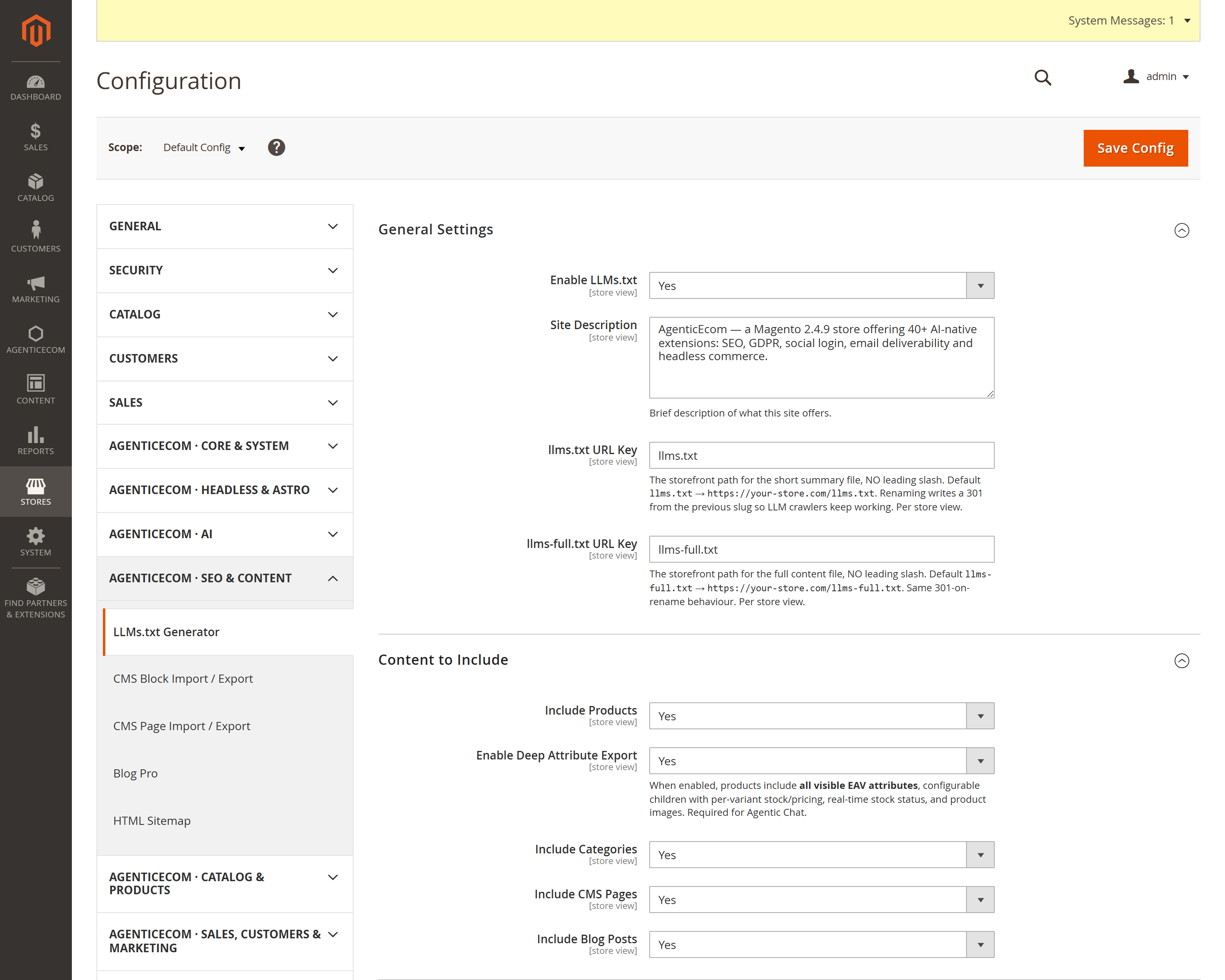
{ "products": [ { "id": 2041, "sku": "AE-BUN-STARTER", "name": "Starter Bundle", "price": 795, "stock": {"in_stock": true}, "attributes": { … }, "variants": [ … ] } ] }Go to Stores → Configuration → AgenticEcom · SEO & Content → LLMs.txt Generator.
Under General Settings, switch Enable LLMs.txt to Yes and write a one-paragraph Site Description — this is what an assistant reads first, so describe what you sell and who for.
Under Content to Include, choose which sections appear in the full file: Products, Categories, CMS Pages, Blog Posts. Turn on Enable Deep Attribute Export if you want full specs, variants, stock and images per product.
(Optional) Under Agentic Chat Integration, enable the JSON Structured Endpoint to
expose /llms-products.json for vector-DB or AI-chat ingestion.
Visit /llms.txt on your storefront to confirm it renders.
Products
Filtered to enabled + visible-in-site products only. A disabled or “not visible individually” product never appears in any of the three files.
Categories, CMS & blog
Categories filtered to active, CMS pages to active, blog posts to published — so nothing hidden from the storefront leaks to a crawler.
No system attributes
Deep mode lists only attributes flagged visible on front (or used in listings), and skips
a long denylist — meta_*, layout/design fields, tax class, cost — so internal data stays
internal.
JSON is opt-in
The structured /llms-products.json endpoint is off by default and returns 403 until you
explicitly enable it, so you decide when full machine-readable product data goes public.
It’s a proposed convention (think robots.txt, but for AI assistants) that gives LLM-powered
tools a clean, authoritative description of your site instead of leaving them to scrape rendered
HTML. As AI search and shopping assistants grow, an accurate llms.txt means your words and
your prices describe your store — not a model’s guess. It costs nothing to publish.
No. Every section filters to active/visible content (enabled + visible-in-site products, active categories, active CMS and published blog posts), and Deep mode lists only front-visible attributes while skipping meta/layout/tax/cost fields. Hidden content stays hidden.
Only if you turn it on. /llms-products.json is disabled by default and returns 403 Forbidden
until you enable JSON Structured Endpoint in the configuration — so exposing full
machine-readable product data is always a deliberate choice.
/llms.txt without breaking crawlers that already found it?Yes — change the URL key in config and a 301 redirect from the previous path is written automatically, per store view, so existing references keep resolving.
Yes — the description, content toggles and URL keys are all per store view, so each locale serves
its own llms.txt from its own catalogue scope. Verified clean on PHP 8.4 and 8.5.