

Magento
Check the exact release against your Magento Open Source version.
Recorded on version 1.0.3 · Narrated walkthrough · English captions
Astro CORS 1.0.3 — Magento Admin setup

00:00:00 — Set up Astro CORS
Welcome to the Agentic Ecom Astro CORS guide. We'll use Magento Admin to review the setup and explain the handoff to your headless storefront. This walkthrough covers stable version 1 point 0 point 3 and assumes the extension is installed.

00:00:16 — Open settings and choose scope
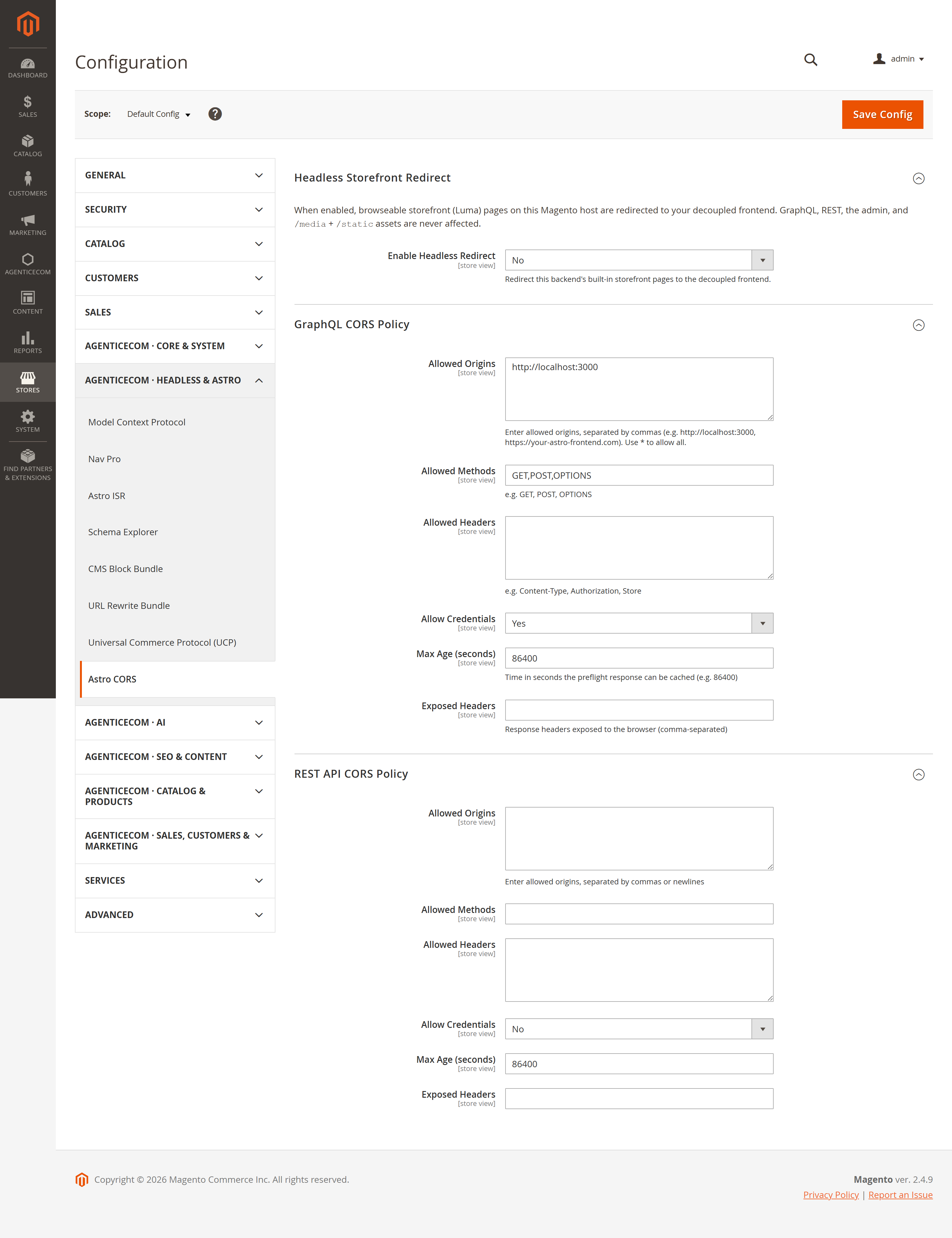
Open Stores, Configuration, then Astro CORS. Check the Scope selector first. Graph Q L and REST have separate policies, so allow the origins used by each part of your storefront. An origin is the scheme, host and optional port, without a page path.

00:00:35 — Allow your GraphQL origins
Expand Graph Q L CORS Policy. Enter the exact storefront origins in Allowed Origins, such as your production H T T P S domain and any approved staging domain. Review Allowed Methods and Allowed Headers for the requests your frontend actually sends. Keep access limited to the sites you control.

00:00:57 — Check credentials and preflight caching
Allow Credentials controls credentialed browser requests. When credentials are needed, use explicit origins rather than a wildcard. Max Age is the browser's preflight cache duration in seconds. Exposed Headers lists response headers your JavaScript needs to read; it does not grant API permissions.

00:01:18 — Review the REST policy
Open REST API CORS Policy and repeat the origin, method and header checks for REST consumers. A working Graph Q L policy does not automatically configure REST. CORS affects browser access; Magento authentication and authorisation still apply to protected operations.

00:01:37 — Decide on the optional redirect
Headless Storefront Redirect is optional. If you enable it, enter your storefront's full base URL and choose the redirect type deliberately. Check Allowed Front Names for payment returns and other callbacks that must remain on Magento. Coordinate this setting with Headless Lock so their behaviour agrees.

00:01:57 — Save and test from the browser
On your staging store, save the configuration and refresh the relevant Magento cache. Open the storefront and inspect its actual API requests in browser developer tools. Verify the preflight and final response for an allowed origin, then confirm an unapproved origin is not granted access. This demonstration has not submitted a configuration change.

00:02:20 — Your setup checklist
Your next steps are to confirm exact allowed origins, review credentials and callback paths, save and test browser api requests. Use a staging store for the end-to-end check. The complete installation and integration reference is at user guides dot Agentic Ecom dot net.
A decoupled (Astro) storefront calls Magento’s GraphQL and REST APIs cross-origin — which the browser blocks unless Magento returns the right CORS headers. Astro CORS adds those headers correctly and safely: a configurable origin allow-list per API, spec-safe wildcard/credentials handling, fast preflight responses, and an optional redirect that points the backend’s leftover Luma pages at your real storefront.
Version 1.0.3 gives this module its own Admin configuration tab, so the settings remain available when AgenticEcom Core is absent.
Install Astro CORS with Composer using your AgenticEcom licence key (find it on your My Licences page — one key unlocks every module you own):
# 1. Register the AgenticEcom repository (once per store)composer config repositories.agenticecom composer https://repo.agenticecom.netcomposer config --global --auth http-basic.repo.agenticecom.net <YOUR-LICENCE-KEY> x
# 2. Require this modulecomposer require agenticecom/module-astro-cors
# 3. Apply itphp bin/magento setup:upgrade && php bin/magento setup:di:compile && php bin/magento cache:flushMagento
PHP
Scope
Security
Allow-list your storefront origins for GraphQL and REST separately.
On every API response from an allowed origin, it sets Access-Control-Allow-Origin (the
exact origin, echoed back), Vary: Origin, and — when enabled and safe —
Access-Control-Allow-Credentials.
OPTIONS preflights are short-circuited at app launch: the request never runs the full
router, it just gets the Allow-Methods / Allow-Headers / Max-Age headers back
immediately.
(Optional) Headless redirect: browseable Luma pages on the Magento host are redirected
to your storefront URL, while /graphql, REST, the admin and /media + /static stay put.
Stores → Configuration → AgenticEcom Astro CORS → Astro CORS
Each API has its own policy:
| Field | What it does |
|---|---|
| Allowed Origins | Comma-separated origins (https://store.example.com), or * for any. |
| Allowed Methods | e.g. GET, POST, OPTIONS. |
| Allowed Headers | e.g. Content-Type, Authorization, Store. |
| Allow Credentials | Send Allow-Credentials: true (ignored for the * origin). |
| Max Age | Preflight cache lifetime in seconds (e.g. 86400). |
| Exposed Headers | Response headers the browser may read. |
| Field | What it does |
|---|---|
| Enable Headless Redirect | Redirect the backend’s Luma pages to your storefront. |
| Storefront URL | Absolute base URL of your decoupled storefront. |
| Redirect Type | 301 (recommended) or 302. |
| Allowed Front Names | Path segments that must keep working on the backend (e.g. sociallogin, payment return URLs). |
For CORS to work, both the OPTIONS preflight and the actual GraphQL/REST response need
Access-Control-Allow-Origin. This module sets it on both — for the actual response too, not
just the preflight — so an allow-listed origin gets a usable response.
Yes, set Allowed Origins to *. Note that credentials are then disabled (per the CORS
spec). If your storefront sends cookies/credentials, list its exact origin instead.
No. The optional headless redirect only affects browseable storefront pages — /graphql, REST,
the admin, and /media + /static assets are explicitly never redirected, and you can
allow-list extra front names (OAuth callbacks, payment returns) that must keep working.
Yes — origins are matched exactly (no substring/regex tricks), the wildcard+credentials hole is
prevented, Vary: Origin is always set, and the config is behind the AgenticEcom_AstroCors
permission. Check exact-release compatibility before deployment.