

Magento
Open Source 2.4.9 GA (and later 2.4.x).
Images are usually the heaviest thing on a product page. Image Optimisation shrinks them: it generates modern WebP/AVIF versions of your catalogue images (typically 25–40% smaller), lazy-loads below-the-fold images while leaving your hero/LCP image eager, and tracks every conversion with its size saving — so pages get lighter and Core Web Vitals improve, with nothing to do per image.
Install Image Optimisation with Composer using your AgenticEcom licence key (find it on your My Licences page — one key unlocks every module you own):
# 1. Register the AgenticEcom repository (once per store)composer config repositories.agenticecom composer https://repo.agenticecom.netcomposer config --global --auth http-basic.repo.agenticecom.net <YOUR-LICENCE-KEY> x
# 2. Require this modulecomposer require agenticecom/module-image-optimisation
# 3. Apply itphp bin/magento setup:upgrade && php bin/magento setup:di:compile && php bin/magento cache:flushMagento
PHP
Engine
Formats
Generates WebP/AVIF copies of catalogue images at a quality you set. The smaller format is served to browsers that support it, falling back to the original elsewhere — typically a 25–40% byte reduction with no visible quality loss.
Adds loading="lazy" to below-the-fold <img> tags — but skips the first N images (your
hero / LCP) and any CSS classes you exclude, so lazy loading speeds up the page without
hurting the Largest Contentful Paint.
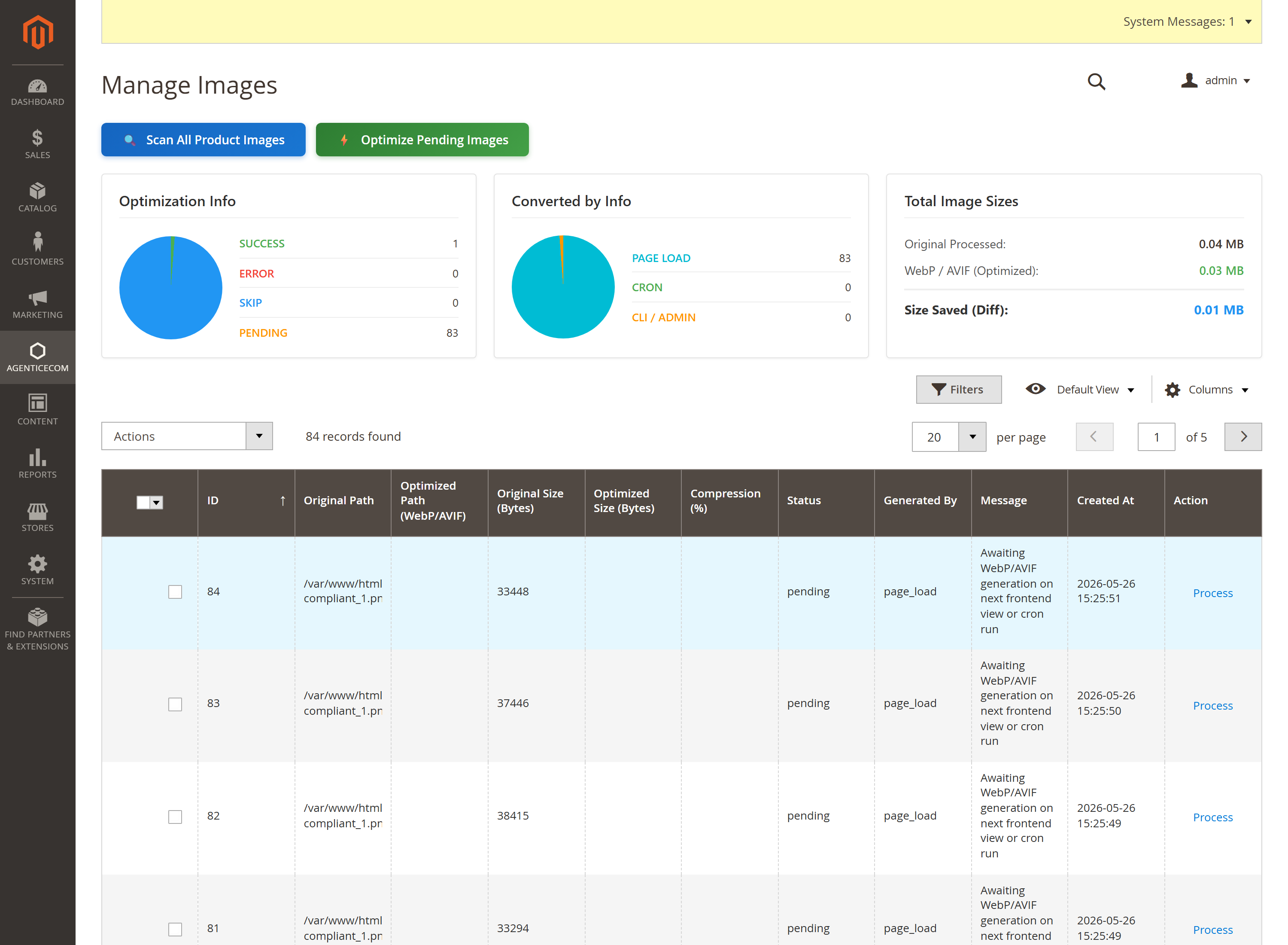
The Manage Images dashboard logs every image: original vs optimised size, compression %, how it was generated (page load / cron / CLI), status and total bytes saved.
On demand — the first time an image is requested, its WebP/AVIF version is generated and cached (then served from cache thereafter).
In bulk — Scan All Product Images finds everything that isn’t optimised yet, and
Optimize Pending Images (or the cron) processes the backlog. The same two steps are available
on the CLI: bin/magento agenticecom:image:scan then bin/magento agenticecom:image:optimize --pending-only (optionally --batch-size=200).
The result is logged with its size saving, and the dashboard shows your running total.
For the initial backfill on an existing catalogue (or scripted/CI runs), use the CLI — it does exactly what the Scan All / Optimize Pending dashboard buttons do:
# 1. Register every existing product image for tracking (marks them "pending")bin/magento agenticecom:image:scan
# 2. Generate WebP + AVIF siblings for the pending imagesbin/magento agenticecom:image:optimize --pending-only
# Big catalogue? Cap each run (default 0 = all):bin/magento agenticecom:image:optimize --pending-only --batch-size=200
# (Re)generate for ALL product images, ignoring the pending list:bin/magento agenticecom:image:optimize| Command | What it does |
|---|---|
agenticecom:image:scan | Scans existing product images and registers them as pending. Run this once after install; new uploads are tracked automatically. |
agenticecom:image:optimize --pending-only | Generates WebP and AVIF for the pending images (respects the Enabled toggles + quality in config). |
--batch-size=N | Processes only N per run — handy to spread a large backfill across cron ticks. |
agenticecom:image:optimize | Without --pending-only, regenerates for the whole catalogue. |
No. The first N images on a page (your above-the-fold hero) are left eager — only below-the-fold
images get loading="lazy". You can also exclude images by CSS class, so a slider or banner you
want loaded immediately stays eager.
No — images are converted on first request and cached, and you can bulk-process the whole catalogue with Scan + Optimize Pending (or let the cron do it). The dashboard tracks what’s done and what’s pending.
It falls back to PHP’s GD extension for WebP generation. Imagick is preferred (cleaner output, no libpng warnings) but isn’t required.
Yes — every source is type- and size-validated before decoding (real JPEG/PNG/GIF, capped bytes, dimensions and pixel count), which blocks decompression-bomb attacks, and Imagick runs with hard resource limits. Verified clean on PHP 8.4 and 8.5.