

Magento
Open Source 2.4.9 GA (and later 2.4.x).
GDPR Pro gives a Magento store the privacy tooling regulators expect: a configurable cookie consent banner with a tamper-evident audit log, and a complete set of data-subject rights — export, deletion and rectification — that customers can exercise themselves. It works on a standard Luma store and on a headless (Astro) storefront, which reads the banner config and submits requests over GraphQL.
Install GDPR Pro with Composer using your AgenticEcom licence key (find it on your My Licences page — one key unlocks every module you own):
# 1. Register the AgenticEcom repository (once per store)composer config repositories.agenticecom composer https://repo.agenticecom.netcomposer config --global --auth http-basic.repo.agenticecom.net <YOUR-LICENCE-KEY> x
# 2. Require this modulecomposer require agenticecom/module-gdprpro
# 3. Apply itphp bin/magento setup:upgrade && php bin/magento setup:di:compile && php bin/magento cache:flushMagento
PHP
Storefront
Articles
Show a configurable consent banner and record every choice with a timestamp, IP address and user-agent — the proof-of-consent regulators ask for.
Configure it under Configuration → GDPR & Privacy → Cookie Consent Banner: enable, position, theme, title, message and an optional Reject button. Consent is captured across four standard categories — Strictly Necessary, Analytics, Marketing, Preferences.
Customers can exercise their rights from their account; each request lands in GDPR & Privacy → Data Requests for you to review and process:
Gathers the customer’s personal data — profile, addresses, orders, reviews and newsletter subscription — into a portable export you can send them.
The “right to be forgotten” — anonymises/removes the customer’s personal data. Processed on approval (it’s irreversible), so nothing is deleted without your sign-off.
The customer describes what’s inaccurate (e.g. “surname should be Smith”); you review and correct it within the statutory window. The current data is snapshotted for the record.
Each request carries the customer email, type and status (Pending → Processed), an admin comment field, and timestamps. Approve and process from the grid.
A headless (Astro) storefront renders the banner from gdprConsentConfig and submits
everything over GraphQL:
# Banner config for the storefront{ gdprConsentConfig { enabled cookie_policy_url privacy_policy_url    consent_categories { code label } } }
# Save the visitor's choices (logged with IP + user-agent)mutation { saveCookieConsent(necessary: true, analytics: true,    marketing: false, preferences: true) { success message } }
# All three require a customer tokenmutation { requestGdprDataExport { success message request_id } }mutation { requestGdprDataDeletion { success message request_id } }mutation { requestGdprDataRectification(details: "surname should be Smith") { success message request_id } }
query { customerGdprData { /* export data + consent history */ } }Stores → Configuration → AgenticEcom · Core & System → GDPR & Privacy (the admin screens — Data Requests and Consent Audit Log — live under Customers → GDPR & Privacy).
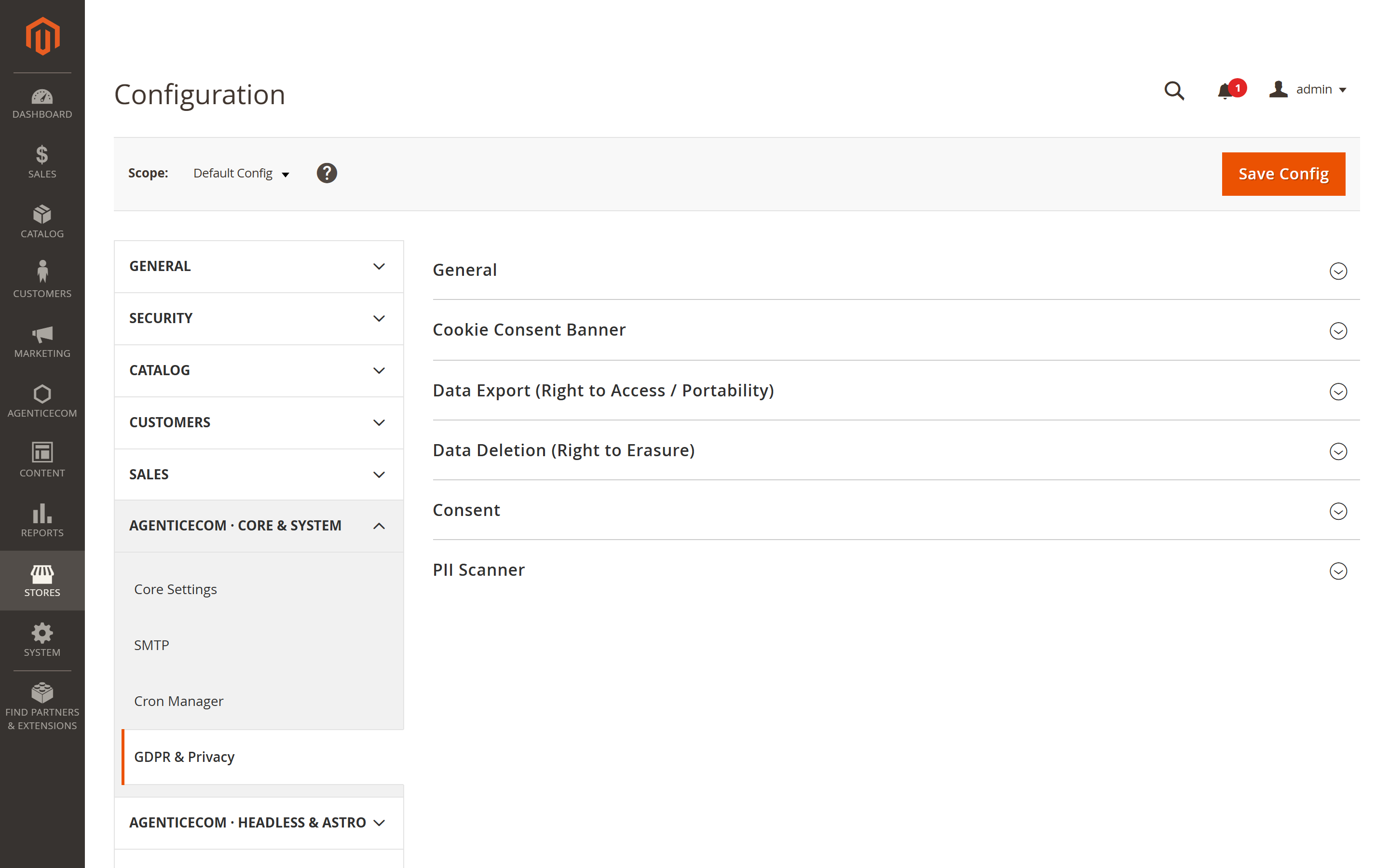
| Group | Key settings |
|---|---|
| General | Enable GDPR compliance, privacy policy page, data-protection contact email, data-retention period (days) |
| Cookie Consent Banner | Enable, position, theme, title, message, show Reject button |
| Data Export / Deletion / Consent | Control the data-subject request flows and consent capture. |
| PII Scanner | Scan stored data for personal information, with optional AI Verification of Findings (Google Gemini) to cut false positives — needs your own Google AI API Key (encrypted) and an AI Model. |
Both. Every consent choice is written to an audit log with the payload, IP address and user-agent and a timestamp — the evidence you need to demonstrate valid consent.
The customer’s profile, addresses, order history, product reviews and newsletter subscription — gathered server-side into a single portable record (GDPR Article 20).
They can request deletion, but it’s only executed after admin approval because erasure is irreversible — protecting you from accidental or fraudulent deletions.
Yes — an Astro storefront reads gdprConsentConfig for the banner and submits consent and
all three data-rights requests over GraphQL, with customer authentication enforced.