

Magento
Open Source 2.4.9 GA (and later 2.4.x).
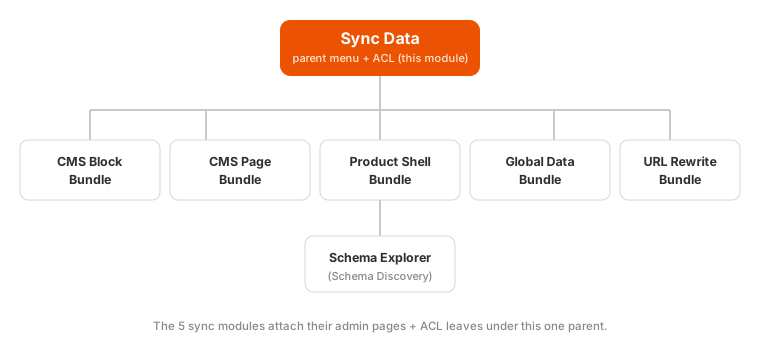
Sync Data is the small infrastructure module that ties the headless-storefront sync suite together. It owns one thing: the shared “Sync Data” admin menu and its ACL resource. Each of the suite’s data modules attaches its own admin page and permission under this parent, so they appear as one tidy, ordered group in the admin and share a single access-control branch.
Install Sync Data (Suite Parent) with Composer using your AgenticEcom licence key (find it on your My Licences page — one key unlocks every module you own):
# 1. Register the AgenticEcom repository (once per store)composer config repositories.agenticecom composer https://repo.agenticecom.netcomposer config --global --auth http-basic.repo.agenticecom.net <YOUR-LICENCE-KEY> x
# 2. Require this modulecomposer require agenticecom/module-sync-data
# 3. Apply itphp bin/magento setup:upgrade && php bin/magento setup:di:compile && php bin/magento cache:flushMagento
PHP
Type
Install
| Menu leaf | Provided by | What it does |
|---|---|---|
| CMS Block Bundle | CmsBlockBundle | Bundles CMS blocks for a headless storefront |
| CMS Page Bundle | CmsBlockBundle | Bundles CMS pages for a headless storefront |
| Product Shell Bundle | ProductShellBundle | Pre-warmed product shells (JSON + GraphQL) |
| Global Data Bundle | GlobalDataBundle | Store config + categories + payment methods |
| URL Rewrite Bundle | UrlRewriteData | URL rewrites for headless routing |
| Schema Explorer | SchemaDiscovery | Discover the GraphQL API surface |
One menu, stable order
Each sync module declares its own menu leaf with a fixed sort order, so the group always renders in the same sensible sequence regardless of install order.
One ACL branch
The parent owns AgenticEcom_SyncData::sync_data; every sync module’s view permission hangs off
it, so an admin role can be granted the whole suite (or individual tools) cleanly.
Always installed together
Every sync module depends on this parent, so the menu and ACL always exist — no module has to duplicate them, and none can render an orphaned menu item.
No — it has no configuration. It only provides the shared admin menu and ACL resource that the sync modules attach to. Configure each sync module on its own page instead.
Every sync module depends on this parent so the “Sync Data” menu and its permission branch always exist. Installing any one sync module brings it in automatically — it’s lightweight and has no runtime behaviour of its own.
Yes — because each tool’s permission hangs off this parent’s ACL branch, you can grant an admin role the whole suite or any individual tool from System → Permissions → User Roles. Verified clean on PHP 8.4 and 8.5.