

Magento
Check the exact release against your Magento Open Source version.
Recorded on version 1.0.3 · Narrated walkthrough · English captions
CMS Page Import / Export 1.0.3 — Magento Admin setup

00:00:00 — Set up CMS Page Import / Export
Welcome to the Agentic Ecom C M S Page Import / Export Admin guide. We'll walk through the main setup screens and the checks to make before using the module. This guide assumes the extension is already installed.

00:00:14 — Open settings and choose scope
Start in Magento Admin and open Stores, Configuration. Choose CMS Page Import / Export. Check the Scope selector before editing. Use the appropriate website or store view where the setting supports it. The screen values here are a demonstration; enter the settings and service details that belong to your own store.

00:00:37 — Enable page import and export
Enable Import and Export in the module configuration. This workflow handles C M S pages, including their content, search metadata, layout and store assignment. Export a representative page first and keep an untouched backup before editing a larger file.

00:00:54 — Open the page workspace
Open Content, Elements, Pages and use the module's import and export controls. Keep page identifiers and store assignments deliberate. An existing identifier identifies an update within the relevant scope; a new identifier creates a separate page. Check the page's URL key and search metadata as well as its visible title.

00:01:17 — Choose import behaviour
In the import workspace, select the target store scope and review the available behaviour. Add and Update changes matching pages and creates new ones. Add Only is useful when existing records should be skipped. Read the summary and row warnings after a small staging import before applying a full content file.

00:01:37 — Verify the rendered page
Reopen affected pages and confirm their store views, layout and metadata. Then visit the public page in each intended store view. H T M L is sanitised on import, so check embedded content and layout in the browser. Clear relevant Magento and storefront caches when an older page remains visible.

00:01:58 — Save and verify your setup
When your required settings are complete, use the screen's Save control and wait for Magento's confirmation. Then reopen the record or configuration and check the saved values at the intended scope. If the storefront still shows earlier settings, refresh the relevant caches. Test your own configuration before using it with customers.

00:02:19 — Your setup checklist
That's the Admin setup walkthrough for C M S Page Import / Export. Check permissions and scope, review the module-specific settings, then save and verify a small staging example. Use the written guide at user guides dot Agentic Ecom dot net for installation details, complete field references and any separate storefront integration steps.
Recreating CMS pages by hand — across store views, between staging and live, or after a rebuild — is slow and error-prone. CMS Page Import / Export turns every page into a row in a plain CSV: export the lot, edit in a spreadsheet or version them in git, then import to create or update pages in place. It carries the full HTML, the SEO metadata, the page layout and the store-view scope — and sanitises HTML on the way in, so an import can’t smuggle script onto your storefront.
Install CMS Page Import / Export with Composer using your AgenticEcom licence key (find it on your My Licences page — one key unlocks every module you own):
# 1. Register the AgenticEcom repository (once per store)composer config repositories.agenticecom composer https://repo.agenticecom.netcomposer config --global --auth http-basic.repo.agenticecom.net <YOUR-LICENCE-KEY> x
# 2. Require this modulecomposer require agenticecom/module-cms-page-import-export
# 3. Apply itphp bin/magento setup:upgrade && php bin/magento setup:di:compile && php bin/magento cache:flushMagento
PHP
Format
Scope
The buttons only appear once the feature is enabled (it is on by default after install).
Go to Stores → Configuration → AgenticEcom · SEO & Content → CMS Page Import / Export.
Set Enable Import / Export to Yes (the default) and Save Config.
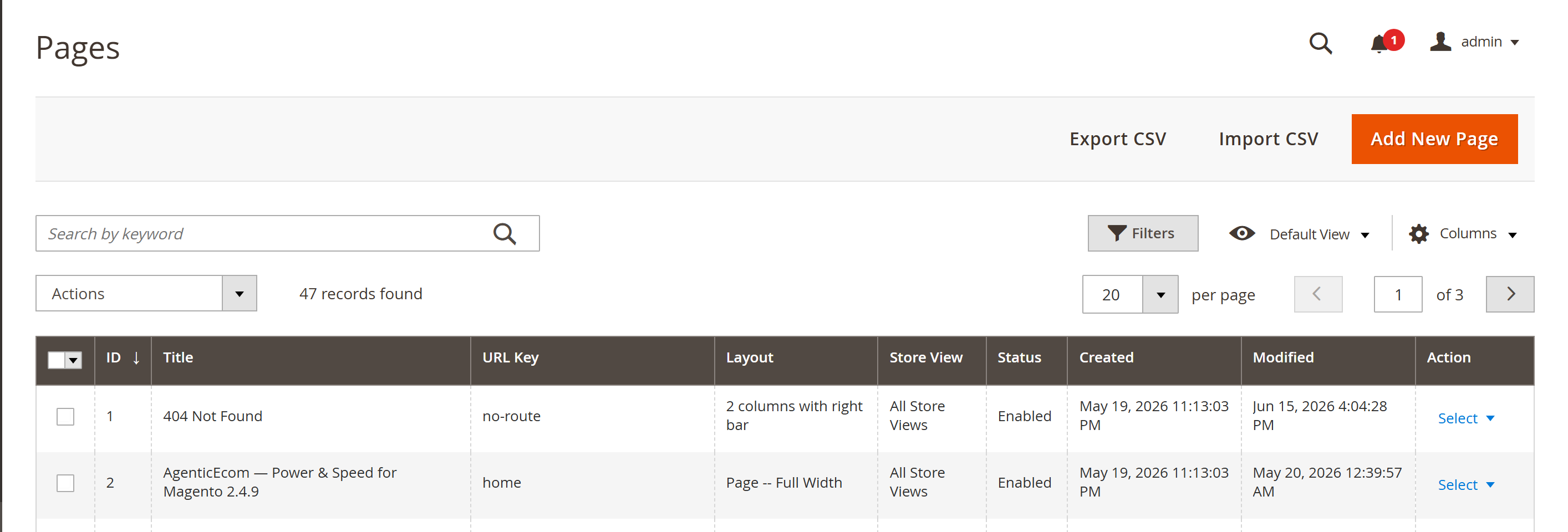
Open Content → Elements → Pages. You’ll now see Import CSV and Export CSV buttons at the top of the grid.
On Content → Elements → Pages, click Export CSV.
Choose the store scope — All Store Views, or a single store view.
Download the file. Every page in scope is written as one row, with its HTML content, metadata, layout and store assignment.
Click Import CSV and upload your file.
Choose the target store scope for the import.
Choose a behaviour:
identifier within the scope and updated in
place; new identifiers are created.Confirm. You get a per-row summary — created, updated and skipped counts, plus any per-row warnings. One bad row never aborts the whole import.
A header row names the columns; order doesn’t matter (they’re matched by name).
| Column | Required | Notes |
|---|---|---|
identifier | ✓ | The upsert key — unique per store scope (e.g. about-us). |
title | ✓ | Page title. |
is_active | ✓ | 1/0 or yes/no. |
stores | ✓ | Pipe-separated store codes (default|fr|es) or all. |
content | ✓ | The page HTML (quoted cell). |
content_heading | — | Optional heading. |
page_layout | — | 1column, 2columns-left, 2columns-right, 3columns, cms-full-width or empty. |
meta_title / meta_keywords / meta_description | — | SEO metadata. |
sort_order | — | Integer; default 0. |
XSS-safe import
On import, <script> tags, inline on* event handlers and javascript: URLs are stripped —
a CSV can’t inject executable code onto your storefront.
Layout preserved
Legitimate markup survives: <style>, Page Builder data-* attributes and video <iframe>
embeds are kept, so your pages still render as designed.
Per-row resilience
Every row is attempted independently. A malformed row is reported and skipped — it never aborts the rest of the import.
Admin-only
Import/export is gated behind the AgenticEcom_CmsPageImportExport::manage permission. There is
no public API surface.
Pages are matched by identifier within the chosen store scope, so a second import updates those
pages in place rather than creating duplicates — one identifier per scope maps to one page.
Yes. Export from store A, then import choosing store B as the target scope. You can also target
multiple store views from a single file using the stores column (default|fr|es, or all).
<script> blocks, inline event handlers (onclick=…, onload=…) and javascript: URLs are stripped
on import. Layout HTML — <style>, Page Builder data-* attributes and YouTube/Vimeo <iframe>
embeds — is preserved.
Upload them to pub/media/cmspages/ and reference them by URL in your page HTML (e.g.
/media/cmspages/banner.jpg). The CSV carries the HTML and the URLs, not the image binaries.
No — it’s an admin tool by design, with no public REST or GraphQL endpoint, so it can’t be driven by an untrusted client. Check exact-release compatibility before deployment.