

Magento owns the data
Products, categories, prices, orders, customers and CMS content all live in Magento and are edited there.
Recorded 14 October 2026 · Narrated walkthrough · English captions
Astro Admin — Dashboard & Navigation 2026-10-14 — Astro Admin setup

00:00:00 — Dashboard & Navigation
Welcome to the Agentic Ecom Astro Admin guide to dashboard & navigation. We're using the Sync Comms storefront to show the current controls. We'll review the workflow with previews, without saving changes to this live store.

00:00:14 — Start in the separate storefront Admin
Open slash admin on your storefront domain and sign in with the administrator credentials provided for this deployment. This is the Astro storefront's control panel. Magento still owns products, categories, prices, customers and orders; Astro Admin controls presentation, copied data and page builds.

00:00:34 — Use the two setup tracks
The Dashboard offers two ways to begin: ship with prebuilt presets, or customise structure, style and theme. Follow a track in order rather than jumping straight to Prebuild. The counts are this Sync Comms store's current data, and will be different on your installation.

00:00:53 — Find the three presentation layers
Structural Presets controls the layout for each page type. Style Presets controls site-wide shape, surfaces and decoration. Theme and Appearance controls colour. Use the Settings links on the left to reach each layer. The page editor then arranges the blocks within a particular page type.

00:01:12 — Find data and publishing controls
The Sync links pull C M S, products, global data, URL rewrites and schema information from Magento. Prebuild Pages turns the current presentation and copied data into storefront pages. Cache Management helps refresh cached results. A successful sync and a completed build are separate checks.

00:01:33 — Use help and preview deliberately
The top bar provides the Help tour, keyboard shortcuts, display and accessibility controls, plus View Storefront. Use the tour when you need a reminder of the interface. Check the actual storefront in a separate tab after your changes are built, including mobile navigation and customer journeys.

00:01:53 — Your next steps
To put this into practice, choose your setup track, review presentation and synced data, build and verify the storefront. Test the complete result on your own staging storefront before publishing. You can follow the written Astro Admin guides at user guides dot Agentic Ecom dot net.
The Agentic Admin is the control panel for your headless Astro storefront. It is a separate app from the Magento admin, and the split matters:
Magento owns the data
Products, categories, prices, orders, customers and CMS content all live in Magento and are edited there.
The Agentic Admin owns the presentation
How that data is arranged (page structure), decorated (style) and coloured (theme) — plus the syncs that copy Magento data into the storefront and the prebuild that bakes it all into fast static pages.
You never edit product or price data here. You decide what the storefront looks like and press the buttons that publish it.
Everything in the Agentic Admin fits one of three jobs. Learn these three words and the whole app makes sense.
Presets decide how the store looks. There are three layers (structure, style, theme) and you can use the ones we ship or build your own.
Syncs pull the latest Magento data (CMS blocks/pages, products, global settings, URL rewrites) into the storefront.
Prebuild bakes your chosen presets + the synced data into static pages that load instantly.
Open the Agentic Admin at /admin on your storefront domain (for example
https://your-store.com/admin) and sign in with the credentials you were given. It is a
separate login from the Magento admin.
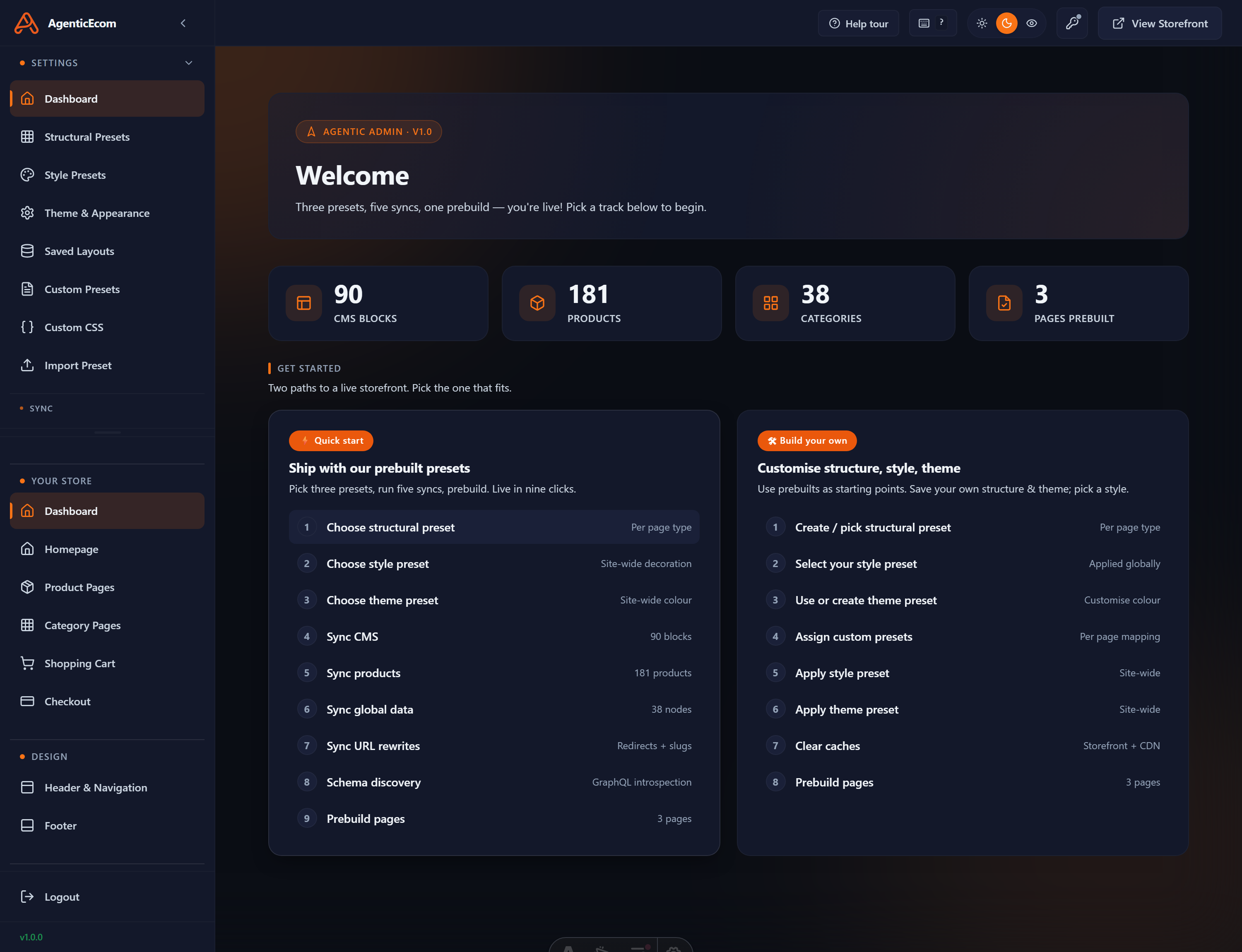
The left sidebar groups every screen into sections — Settings (presets, theme, CSS), Your Store and Design (the per-page-type page editor), and Sync.
The top bar (on every screen) has: a guided Help tour, keyboard-shortcuts, a light/dark toggle, an accessibility menu, and View Storefront to open the live site in a new tab.