

Magento
Check the exact release against your Magento Open Source version.
Recorded on version 1.0.2 · Narrated walkthrough · English captions
URL Rewrite Bundle 1.0.2 — Magento Admin setup

00:00:00 — Set up URL Rewrite Bundle
Welcome to the Agentic Ecom URL Rewrite Bundle guide. We'll use Magento Admin to review the setup and explain the handoff to your headless storefront. This walkthrough covers stable version 1 point 0 point 2 and assumes the extension is installed.

00:00:17 — Open the route snapshot
Open Agentic Ecom, Sync Data, URL Rewrite Bundle. It prepares Magento URL rewrites for your headless storefront to resolve locally. Check the selected store and generation time. Refresh the snapshot after URL-key or rewrite changes rather than assuming an old copy is current.

00:00:37 — Review refresh and download
Refresh Bundle regenerates the saved rewrite data. Check its result and the entity-type summary, then use Download JSON if your developer needs to inspect it. A refreshed Magento snapshot still needs to be pulled into the storefront using Sync URL Rewrites in Astro Admin.

00:00:56 — Check bundle filtering
Open Stores, Configuration, URL Rewrite Bundle, Bundle Filtering. Validate Entity Exists filters references to missing entities. Review this setting in staging with your routing requirements, save any intended change and refresh the snapshot so the filter is reflected in the exported data.

00:01:16 — Review redirect import separately
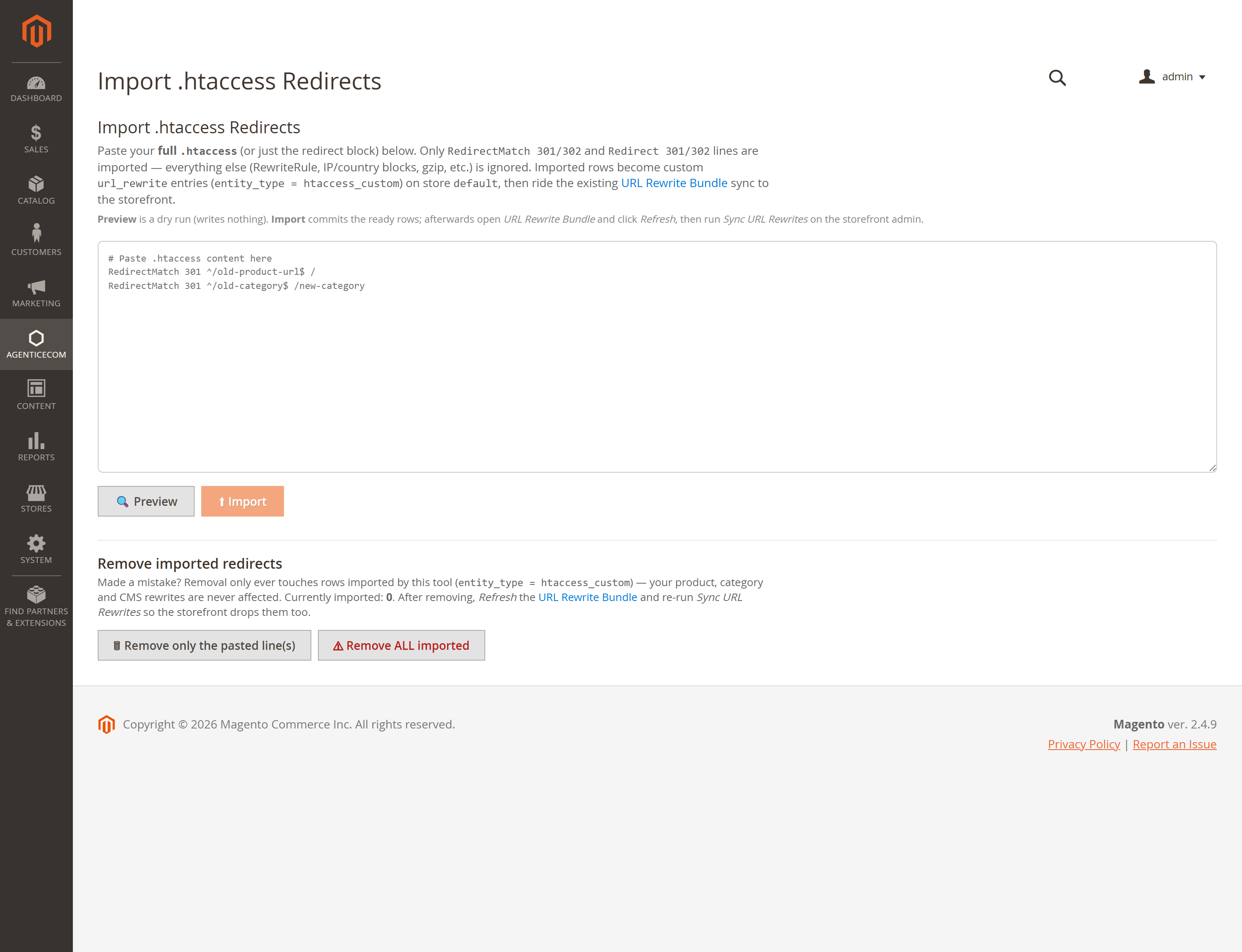
Import dot H T access Redirects is a separate tool for supported redirect rules. Review the supplied rules and their preview before importing anything. Preserve your existing redirects and check for loops or unintended destinations. This recording opens the import screen but does not import or remove redirects.

00:01:38 — Sync and test complete URLs
In Astro Admin, run Sync URL Rewrites after the Magento snapshot is ready. Prebuild the affected pages as needed. Test a product URL, a category URL, a C M S URL and a known redirect, using the correct store view. Check both the response status and the final destination.

00:02:00 — Your setup checklist
Your next steps are to refresh the correct store snapshot, review filters and any redirect import, sync and test urls and redirects. Use a staging store for the end-to-end check. The complete installation and integration reference is at user guides dot Agentic Ecom dot net.
A headless storefront still needs Magento’s URL rewrites — the map of clean URLs to products, categories and CMS pages, plus every 301/302 redirect. URL Rewrite Data bundles all of them into a versioned JSON snapshot and GraphQL feed so your Astro frontend can resolve any incoming path (and issue redirects) at the edge. It also includes a genuinely safe .htaccess redirect importer for migrating legacy redirects.
Install URL Rewrite Data with Composer using your AgenticEcom licence key (find it on your My Licences page — one key unlocks every module you own):
# 1. Register the AgenticEcom repository (once per store)composer config repositories.agenticecom composer https://repo.agenticecom.netcomposer config --global --auth http-basic.repo.agenticecom.net <YOUR-LICENCE-KEY> x
# 2. Require this modulecomposer require agenticecom/module-url-rewrite-data
# 3. Apply itphp bin/magento setup:upgrade && php bin/magento setup:di:compile && php bin/magento cache:flushMagento
PHP
Delivery
Migration
{ urlRewriteBundle { store_code count version rewrites { request_path target_path redirect_type entity_type } }}Every rewrite for the store — product, category, CMS and custom — with a version hash so your build can skip a rebuild when nothing changed.
From URL Rewrite Bundle, click Refresh to write a JSON snapshot, then Download it or pull it in your build pipeline. A plugin on Magento’s rewrite persistence keeps the data fresh as you edit the catalogue.
Moving from a legacy platform? Paste your old .htaccess and import the redirects — safely.
Open Import .htaccess Redirects, paste your whole .htaccess (or just the redirect block).
Click Preview — a dry run classifies every line into ready, needs-review (regex), collision or unsupported, writing nothing.
Click Import to commit the ready rows. Refresh the URL Rewrite Bundle and your headless storefront picks them up.
Unsafe targets neutralised
A redirect target that isn’t a normal http(s) URL is forced to a same-site path, so a
javascript: or protocol-relative (//evil.com) target in a pasted file can’t become an
open-redirect or script URL.
Only literal redirects
RedirectMatch rules with real regex are flagged for manual review rather than guessed at — only
a literal, fully-anchored path maps cleanly to a rewrite, so nothing is imported wrong.
Never clobbers Magento rewrites
Import, update and delete all operate only on the import marker, in a single transaction — your catalogue’s own rewrites are never modified or removed.
Admin-only
Every bundle and import action is permission-gated, and the snapshot download path is sanitised.
Your frontend has to know how to resolve clean URLs to products/categories/pages and honour every 301/302 redirect. The bundle hands it the whole rewrite map (with a version hash) in one call, so it can route and redirect at the edge without querying Magento per request.
Yes. It previews as a dry run first, only ever writes/updates/deletes rows it owns
(htaccess_custom), reports anything that would collide with a real Magento rewrite instead of
touching it, and can be fully undone with one click.
javascript: or //evil.com redirect target?It’s forced to a same-site path (e.g. /javascript:…), so it can’t act as a script URL or an
open-redirect to an external site. Genuine http(s):// targets you intend are kept as-is.
Only Redirect and RedirectMatch directives with a 301 or 302 status, and only when the path is a
literal (regex patterns are flagged for review). Everything else — RewriteRule, IP/country blocks,
gzip, comments — is ignored, so pasting a whole file is safe. Check exact-release compatibility before deployment.