

Magento
Check the exact release against your Magento Open Source version.
Recorded on version 1.0.2 · Narrated walkthrough · English captions
CMS Block & Page Bundle 1.0.2 — Magento Admin setup

00:00:00 — Set up CMS Block & Page Bundle
Welcome to the Agentic Ecom CMS Block & Page Bundle guide. We'll use Magento Admin to review the setup and explain the handoff to your headless storefront. This walkthrough covers stable version 1 point 0 point 2 and assumes the extension is installed.

00:00:17 — Open the block bundle
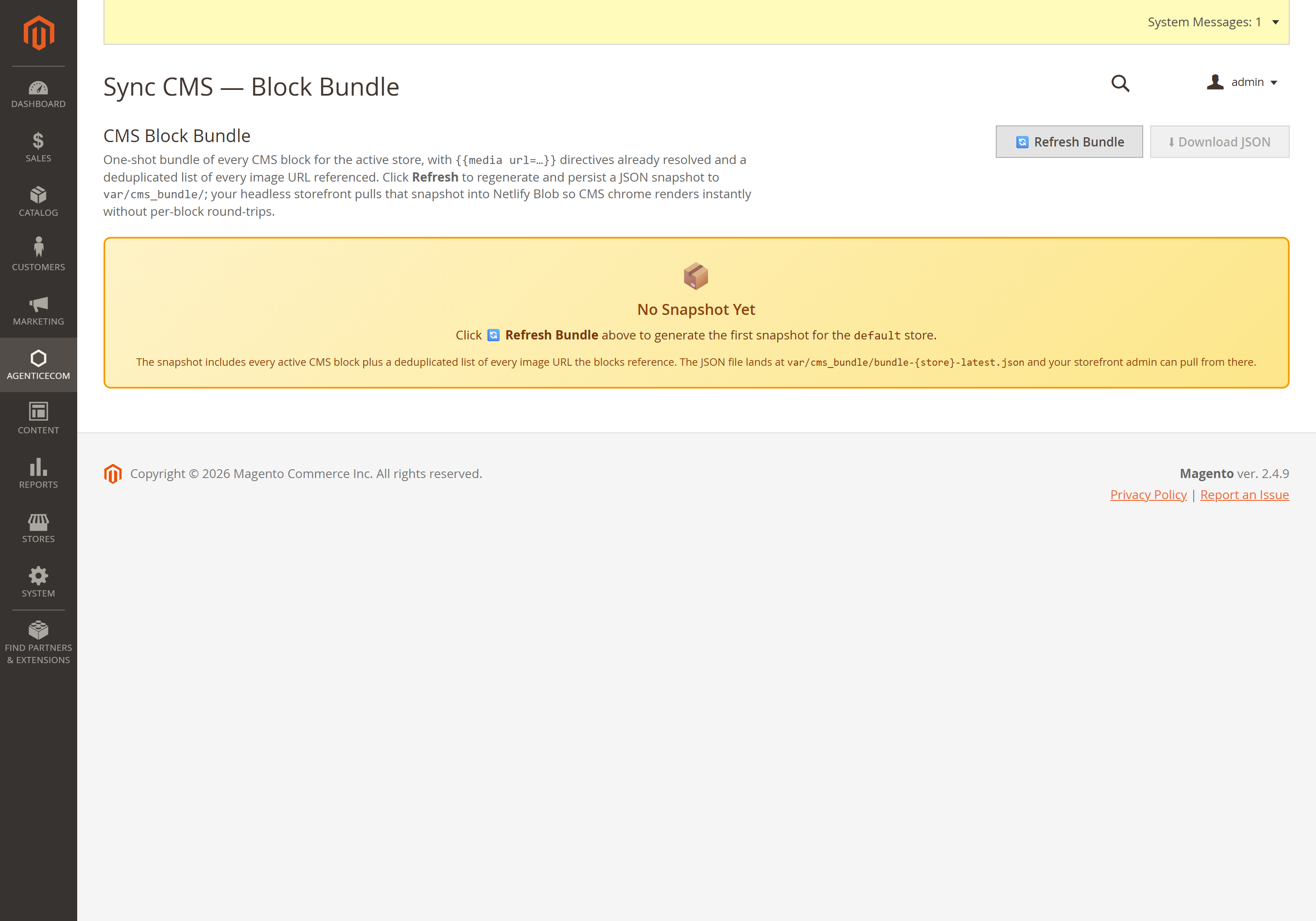
Open Agentic Ecom, Sync Data, CMS Block Bundle. This screen reads a stored snapshot for the selected Magento store. Check the store and generation information. No Snapshot Yet means you need to generate the first bundle before the storefront can consume it.

00:00:36 — Review the refresh and download controls
Refresh Bundle regenerates the saved snapshot from Magento content. After it completes on your store, check the content counts and generation time. Download JSON lets your developer inspect the snapshot. Refreshing this Magento bundle is a different step from pulling it into Astro Admin.

00:00:56 — Include CMS pages
CMS Page Bundle is the companion screen under the same Sync Data menu. It prepares the C M S pages used by your storefront. After editing blocks or pages in Magento, refresh the appropriate bundle and check that your saved, active content is included. Draft content should remain private.

00:01:16 — Review HTML sanitising
Open Stores, Configuration, CMS Block Bundle, HTML Sanitiser. Sanitise C M S Content controls the cleanup applied to content in the bundle. Review your content in staging before changing it: removing embedded styling can affect the appearance of older content. Your frontend remains responsible for rendering it appropriately.

00:01:39 — Configure the optional image CDN
Image C D N Rewriting has an optional base URL for your media delivery service. Only set it when that service serves the corresponding Magento media paths. After saving, regenerate the snapshots, then use Sync C M S in Astro Admin. Check a content page and its images, and prebuild the affected storefront pages.

00:02:02 — Your setup checklist
Your next steps are to check the correct magento store, refresh blocks and pages as needed, sync cms and verify the storefront. Use a staging store for the end-to-end check. The complete installation and integration reference is at user guides dot Agentic Ecom dot net.
A headless storefront needs your CMS blocks (header strips, promos, footers) and pages
(about, policies, landing pages) — but fetching them one-by-one over the standard GraphQL is
slow and leaves {{media}} directives unresolved. CMS Bundle returns all of them in a
single call, with directives already resolved to absolute (or CDN) URLs, HTML sanitised, a
deduplicated list of every referenced image, and a version hash so the storefront knows when
to re-fetch.
Install CMS Bundle (Blocks & Pages) with Composer using your AgenticEcom licence key (find it on your My Licences page — one key unlocks every module you own):
# 1. Register the AgenticEcom repository (once per store)composer config repositories.agenticecom composer https://repo.agenticecom.netcomposer config --global --auth http-basic.repo.agenticecom.net <YOUR-LICENCE-KEY> x
# 2. Require this modulecomposer require agenticecom/module-cms-block-bundle
# 3. Apply itphp bin/magento setup:upgrade && php bin/magento setup:di:compile && php bin/magento cache:flushMagento
PHP
Multi-store
Safe
{ cmsBlockBundle { version count image_count blocks { identifier title content is_active update_time } images { url referenced_by } } }Every active block for the store, content fully resolved + sanitised.
{ cmsPageBundle { version count pages { identifier title content meta_title meta_description page_layout is_active } images { url referenced_by } } }The whole CMS page tree, ready to render client-side.
{ cmsBlockSingle(identifier: "header_promo") { identifier content update_time } }{ cmsPageSingle(identifier: "about-us") { identifier content is_active } }Surgical per-item refresh after a merchant edit — no full-bundle re-fetch.
Resolves directives — {{media url=...}}, {{store url=...}} and nested {{block id=...}}
become absolute URLs (a missing/broken directive falls back to raw content with a log, never
crashing the bundle).
Sanitises HTML (when enabled) — strips inline styles/classes/IDs and Word/MSO junk, and
rewrites CMS block-embed directives to <div data-cms-block-id="…"> placeholders your
storefront renders.
Rewrites media to your CDN (when configured) — every /pub/media/ URL points at your
storefront’s image CDN instead of Magento.
Extracts every image into a deduplicated list with which blocks/pages reference each one — so your storefront can pre-fetch and rehost them, and a missing image is traceable.
Stamps a version hash — timestamp + sha1 of all content, so the storefront re-fetches only when something actually changed.
cmsBlocks query?Speed and completeness. One store-scoped DB round-trip returns every block with directives already
resolved, versus the standard resolver querying scope per identifier and leaving {{media}}
placeholders for you to resolve. Your storefront pre-warms a content cache once and serves CMS
chrome instantly.
Compare the version hash. It changes only when block/page content or timestamps change, so the
storefront re-fetches the bundle just when needed — and cmsBlockSingle / cmsPageSingle let a
webhook patch a single item without a full refresh.
Yes — every query is store-scoped (store_id, defaulting to the request’s store), so a UK and a
DE store view each get their own correctly-scoped block and page set.
When the sanitiser is enabled, content is run through an allow-list that strips inline styles/classes and editor junk and normalises embed directives — so what reaches your storefront is clean, predictable HTML. Check exact-release compatibility before deployment.