

Magento
Check the exact release against your Magento Open Source version.
Recorded on version 1.0.2 · Narrated walkthrough · English captions
Import Category Replace 1.0.2 — Magento Admin setup

00:00:00 — Set up Import Category Replace
Welcome to the Agentic Ecom Import Category Replace Admin guide. We'll walk through the main setup screens and the checks to make before using the module. This guide assumes the extension is already installed.

00:00:13 — Open settings and choose scope
Start in Magento Admin and open Stores, Configuration. Choose Product Import Settings. Check the Scope selector before editing. Use the appropriate website or store view where the setting supports it. The screen values here are a demonstration; enter the settings and service details that belong to your own store.

00:00:34 — Choose category handling
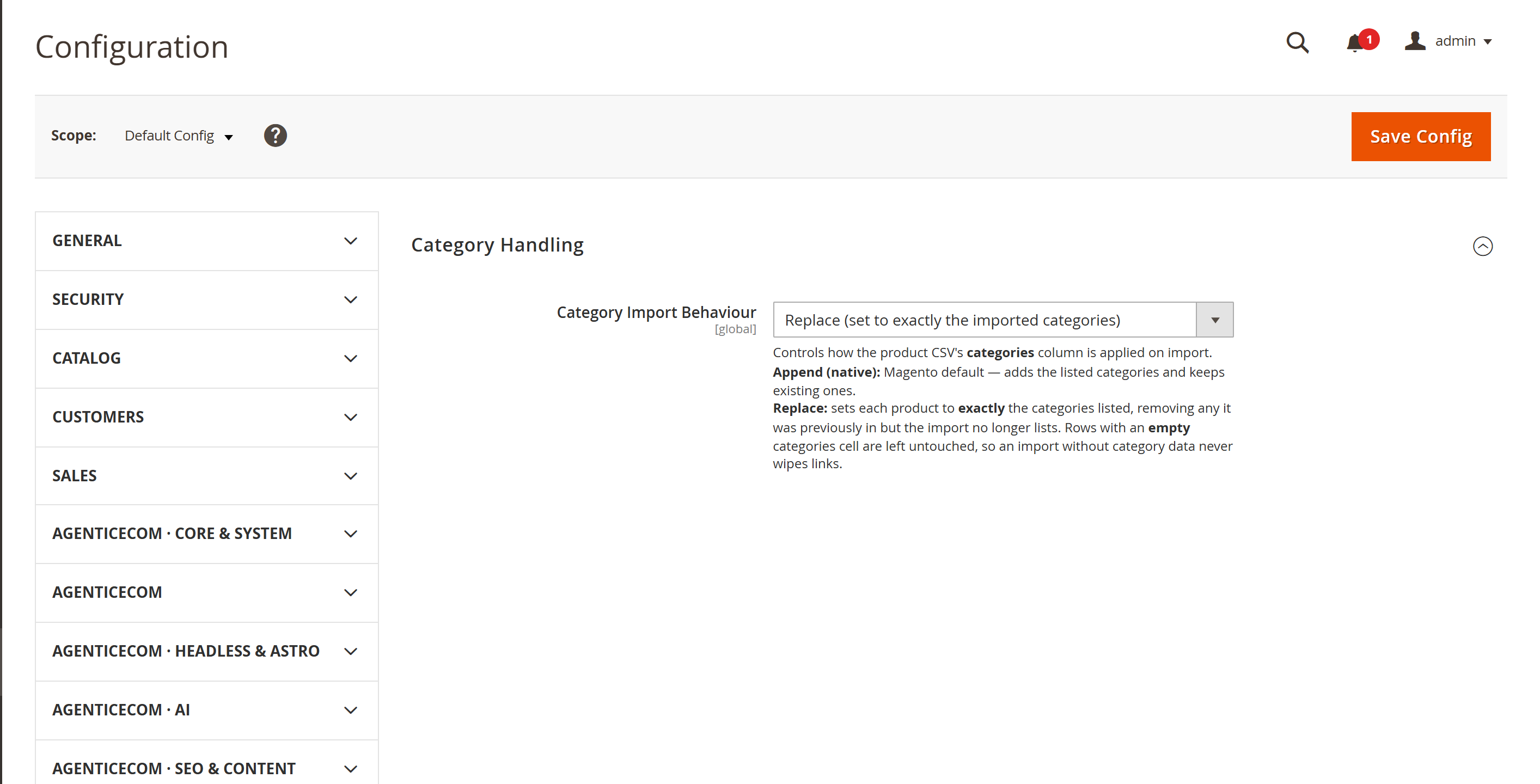
Open Category Handling in Product Import Settings. Review the category replacement option before using Magento's product import. The purpose is to let the categories listed in a row become authoritative, rather than leaving old category assignments attached to the product.

00:00:52 — Open Magento product import
Open System, Data Transfer, Import and choose Products as the entity type. Prepare the file using Magento's expected product C S V columns. Keep a backup of the catalogue and export the affected products first, including their current category assignments.

00:01:10 — Prepare a controlled category update
Start with one or two disposable staging products. Check the S K U and the full intended category path values carefully. Replacing categories can remove assignments that are absent from the row, so confirm your final category list rather than treating the import as an append operation.

00:01:29 — Verify assignments after import
After validating and importing the small file, reopen each affected product and inspect its category assignments. Check category listings and URL behaviour in the intended store view. Expand to a larger selection only after the new list and the removal of unwanted old assignments are both confirmed.

00:01:49 — Save and verify your setup
When your required settings are complete, use the screen's Save control and wait for Magento's confirmation. Then reopen the record or configuration and check the saved values at the intended scope. If the storefront still shows earlier settings, refresh the relevant caches. Test your own configuration before using it with customers.

00:02:10 — Your setup checklist
That's the Admin setup walkthrough for Import Category Replace. Check permissions and scope, review the module-specific settings, then save and verify a small staging example. Use the written guide at user guides dot Agentic Ecom dot net for installation details, complete field references and any separate storefront integration steps.
Magento’s product CSV import has a behaviour that catches everyone out: it appends categories. Import a product with categories and Magento adds them to whatever the product already has — and never removes the ones you left out. So when you re-categorise a catalogue, the import dutifully adds the new categories and leaves all the old ones in place, stranding every product in both. Import Category Replace adds the missing option: make the categories column authoritative, so the row defines a product’s complete, final category set.
Install Import Category Replace with Composer using your AgenticEcom licence key (find it on your My Licences page — one key unlocks every module you own):
# 1. Register the AgenticEcom repository (once per store)composer config repositories.agenticecom composer https://repo.agenticecom.netcomposer config --global --auth http-basic.repo.agenticecom.net <YOUR-LICENCE-KEY> x
# 2. Require this modulecomposer require agenticecom/module-import-category-replace
# 3. Apply itphp bin/magento setup:upgrade && php bin/magento setup:di:compile && php bin/magento cache:flushMagento
PHP
Scope
bin/magento).Safe
| Scenario | Native import (append) | With Replace turned on |
|---|---|---|
| Product in “Old Range”, CSV row says “New Range” | Ends up in both | Ends up in “New Range” only |
| Move 2,000 products to a new taxonomy | Hours of manual un-assigning | One import |
| A category not listed in a product’s row | Kept | Removed |
| A row with an empty categories cell | — | Left untouched (never wipes) |
| Price, stock, other attributes | Imported as normal | Imported as normal |
Flip the behaviour once in config, then every product import respects it.
Stores → Configuration → AgenticEcom · Catalog → Product Import Settings → Category Handling
Set Category Import Behaviour to Replace (the default is Append, which is native Magento). Save config.
Prepare your product CSV as usual, with the categories column holding the exact categories
each product should belong to (Magento’s standard Default Category/Parent/Child path format).
Run the import normally — System → Data Transfer → Import, entity Products (or via CLI). Every row with a non-empty categories cell is set to exactly those categories; stale links are removed. Everything else imports as it always did.
No — same columns, same categories path format as native import. You just set the behaviour to
Replace in config.
In Replace mode it’s removed from that product. The row defines the complete, final set of categories.
No. Rows with an empty categories cell are skipped entirely, and a value that resolves to no valid category id is skipped too — so a partial import (price only, stock only) never touches category links.
Yes. It observes catalog_product_import_bunch_save_after in global scope, so it applies whether
the import runs from the admin or bin/magento import commands.
Category Manager for shaping the tree and Bulk Product Operations for sweeping product changes.