

Magento
Open Source 2.4.9 GA (and later 2.4.x).
Analytics wires Magento into the Google measurement stack — GA4, Google Tag
Manager and Google Ads — and does it properly for a headless store: the full GA4
ecommerce data layer is delivered over GraphQL, so an Astro storefront pushes exactly the
right view_item, view_item_list, add_to_cart and purchase events without you
hand-coding any of them. It also does server-side tracking with Consent Mode, fires
Google Ads conversions, and gives you an in-admin sales dashboard.
Install Analytics (GA4 / GTM) with Composer using your AgenticEcom licence key (find it on your My Licences page — one key unlocks every module you own):
# 1. Register the AgenticEcom repository (once per store)composer config repositories.agenticecom composer https://repo.agenticecom.netcomposer config --global --auth http-basic.repo.agenticecom.net <YOUR-LICENCE-KEY> x
# 2. Require this modulecomposer require agenticecom/module-analytics
# 3. Apply itphp bin/magento setup:upgrade && php bin/magento setup:di:compile && php bin/magento cache:flushMagento
PHP
Headless
Privacy
A headless storefront can’t use Magento’s page-rendered GTM snippet — it has to build the GA4 data layer itself. This module hands it over ready-made:
{ analyticsConfig { gtm_container_id ga4_measurement_id enabled enhanced_ecommerce cookie_consent_required consent_mode_default google_ads { tag_id conversion_enabled conversion_send_to remarketing_enabled remarketing_id } } }The storefront injects the GTM/GA4/Ads tags from this — including a ready-to-use
conversion_send_to (AW-XXXX/LABEL) for the purchase conversion.
{ analyticsDataLayer(page_type: "product", entity_id: 2045) { page_type currency data_layer_json # full GA4 event, push straight to window.dataLayer ecommerce { value currency items { item_id item_name price item_brand } } } }For a product page this returns the complete view_item event; for a category it returns
view_item_list for the category’s products. The storefront just pushes data_layer_json.
# Success page — ownership-checked, returns the GA4 purchase payload{ analyticsOrderData(order_number: "000000123") {    transaction_id value tax shipping currency coupon    items { item_id item_name price quantity } } }
# Optional server-side event forwarding (Measurement Protocol)mutation { trackAnalyticsEvent(event_name: "add_to_cart", event_data: "{\"value\":29.99,\"currency\":\"GBP\"}") }A toggle per GA4 recommended event, so you send exactly what you want:
view_item · view_item_list · select_item · add_to_cart · remove_from_cart ·
view_cart · begin_checkout · add_shipping_info · add_payment_info · add_to_wishlist
· purchase · refund · search · login · sign_up.
Server-side events
Forward events to GA4 via the Measurement Protocol (an API secret), so conversions are recorded even when ad-blockers or ITP strip the client-side tag. A cron also back-fills any missed purchases.
Consent Mode
Ship Google Consent Mode v2 defaults (granted/denied) so tags respect the visitor’s cookie choice from the first page view.
Google Ads
Fire purchase conversions and dynamic remarketing with the right send_to value,
assembled for you from the conversion ID + label.
Privacy-safe
Customer identifiers are SHA-256 hashed, the public event endpoint is allow-listed to known GA4 events and rate-limited per IP, and order data is ownership-checked.
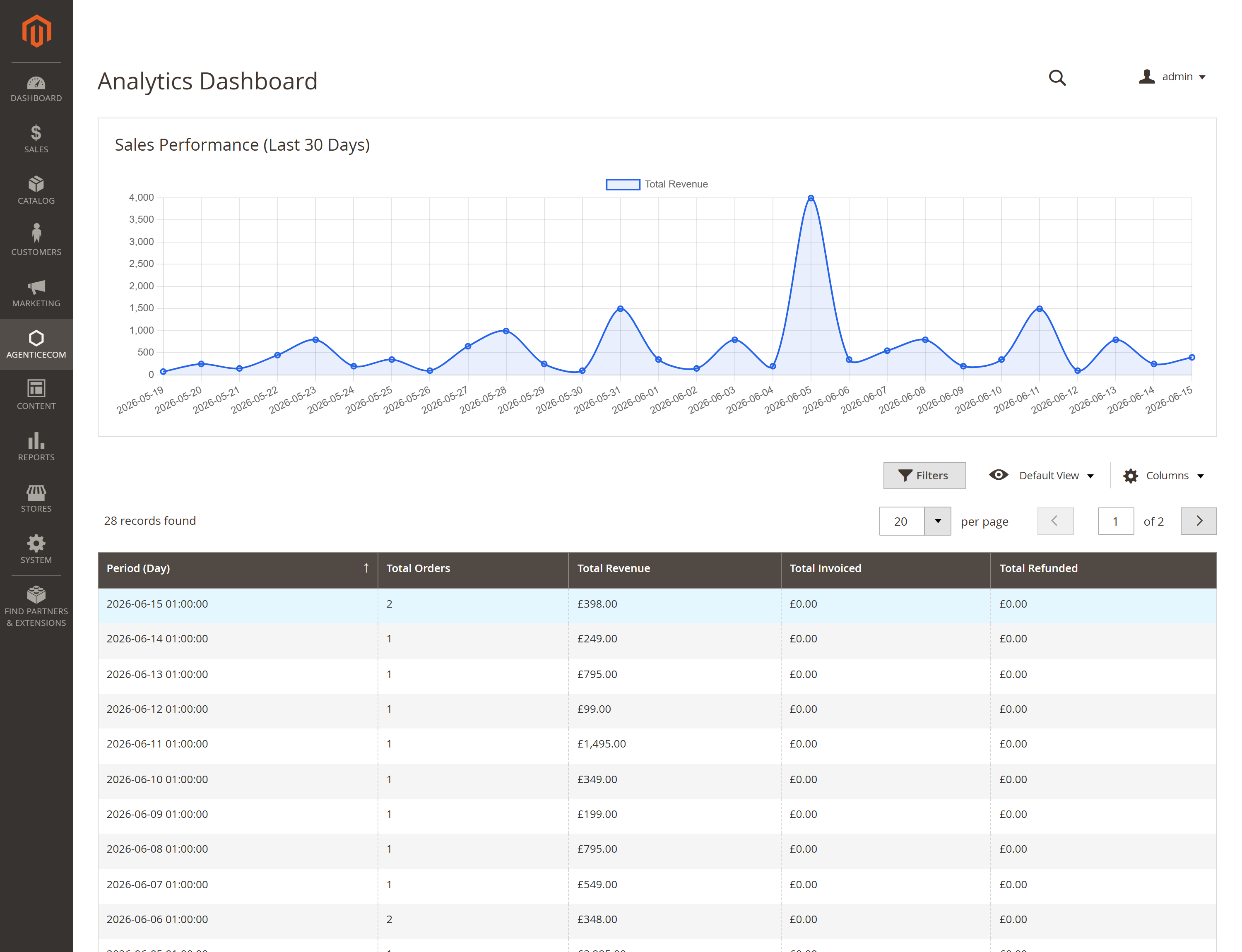
AgenticEcom → Analytics → Dashboard gives you a quick in-Magento read on sales performance — a revenue trend chart plus a per-day grid of orders, revenue, invoiced and refunded totals — so you don’t have to leave the admin for a top-line view.
Stores → Configuration → AgenticEcom · Sales, Customers & Marketing → Analytics & Tracking
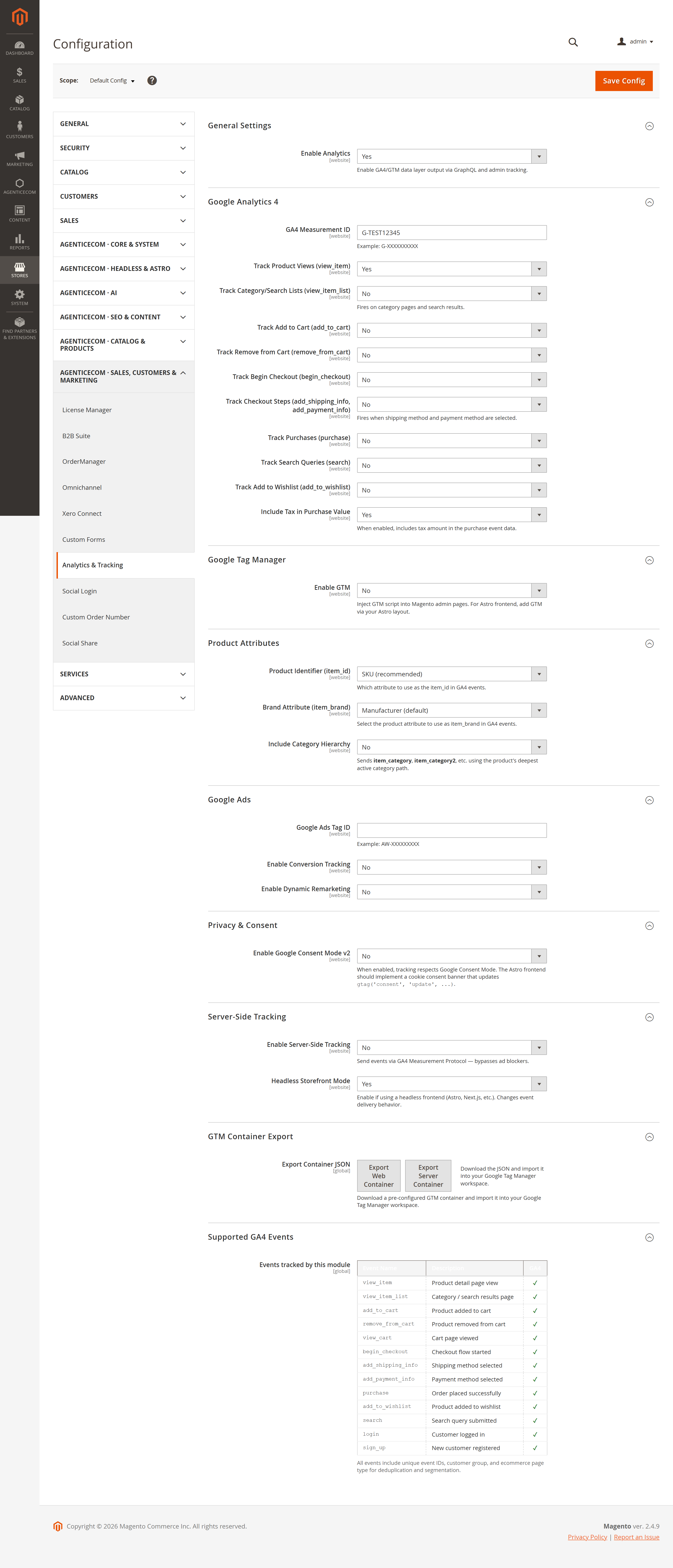
| Group | Key settings |
|---|---|
| General | Enable the module. |
| Google Analytics 4 | Measurement ID, and a per-event tracking toggle for every GA4 event; include tax in purchase value. |
| Google Tag Manager | Enable + container ID. |
| Product Attributes | Product identifier (SKU/ID), brand attribute, category tracking + depth. |
| Google Ads | Tag ID, conversion ID/label + enable, remarketing ID + enable. |
| Privacy | Consent Mode on/off and default state. |
| Server-Side | Enable Measurement-Protocol forwarding, API secret, headless flag, track missing purchases, track admin orders. |
It queries analyticsConfig to inject the tags and analyticsDataLayer(page_type, entity_id)
per page — the module returns the complete GA4 event as data_layer_json, which the storefront
pushes straight to window.dataLayer. No event mapping to maintain on the front end.
No. analyticsOrderData requires a logged-in customer and verifies the order belongs to them,
so the purchase payload is only ever returned to its owner.
It’s hardened: only a fixed allow-list of recognised GA4 event names is accepted, and it’s rate-limited per client IP — so it can’t be used to inject arbitrary events or flooded.
Yes — it ships Google Consent Mode defaults you control, so tags honour the visitor’s choice, and customer identifiers are hashed before they’re sent.
Enable server-side tracking and events are sent to GA4 via the Measurement Protocol from your server, with a cron that back-fills any purchases the client-side tag missed.